Leading industrial special communication provider with rich global cases. Our explosion-proof & SIP dispatch systems power projects—your reliable partner with proven success.
Leading industrial special communication provider with rich global cases. Our explosion-proof & SIP dispatch systems power projects—your reliable partner with proven success.
How to Integrate Explosion-Proof Telephones with Unified Communications
Learn how explosion-proof telephones connect to unified communications through direct SIP registration, FXS gateways and hybrid networks, with practical guidance on call routing, paging integration, resilience and commissioning.
Becke Telcom
Installing an explosion-proof telephone addresses the field-terminal requirement, but it does not complete the communication system. Reliable operation also depends on how the telephone reaches the control room, how calls are routed, how operators identify the calling location, and how a confirmed incident is escalated to paging or emergency notification.
Explosion-proof telephones can be connected through direct SIP registration, an FXS voice gateway or a hybrid architecture that combines existing analog lines with new IP endpoints. The correct method depends on field cabling, network availability, operational procedures and the services that must remain available during a fault.
Set the Boundary Between Hazardous and Safe Areas
System design should begin with the hazardous-area boundary. Field telephones may be installed around process units, loading areas, tank farms, pump stations and other locations identified by the site risk assessment. IP PBX servers, voice gateways, recording systems, dispatch consoles and core network switches are normally placed in a control room, equipment room or another suitable safe area.
Keeping central equipment outside the classified area simplifies maintenance and reduces the amount of active equipment exposed to hazardous conditions. However, every switch, power unit, junction box, media converter and cable entry installed inside a classified area still requires its own suitability assessment. It does not inherit the protection status of the telephone simply because both devices belong to the same communication system.
A typical communication path is:
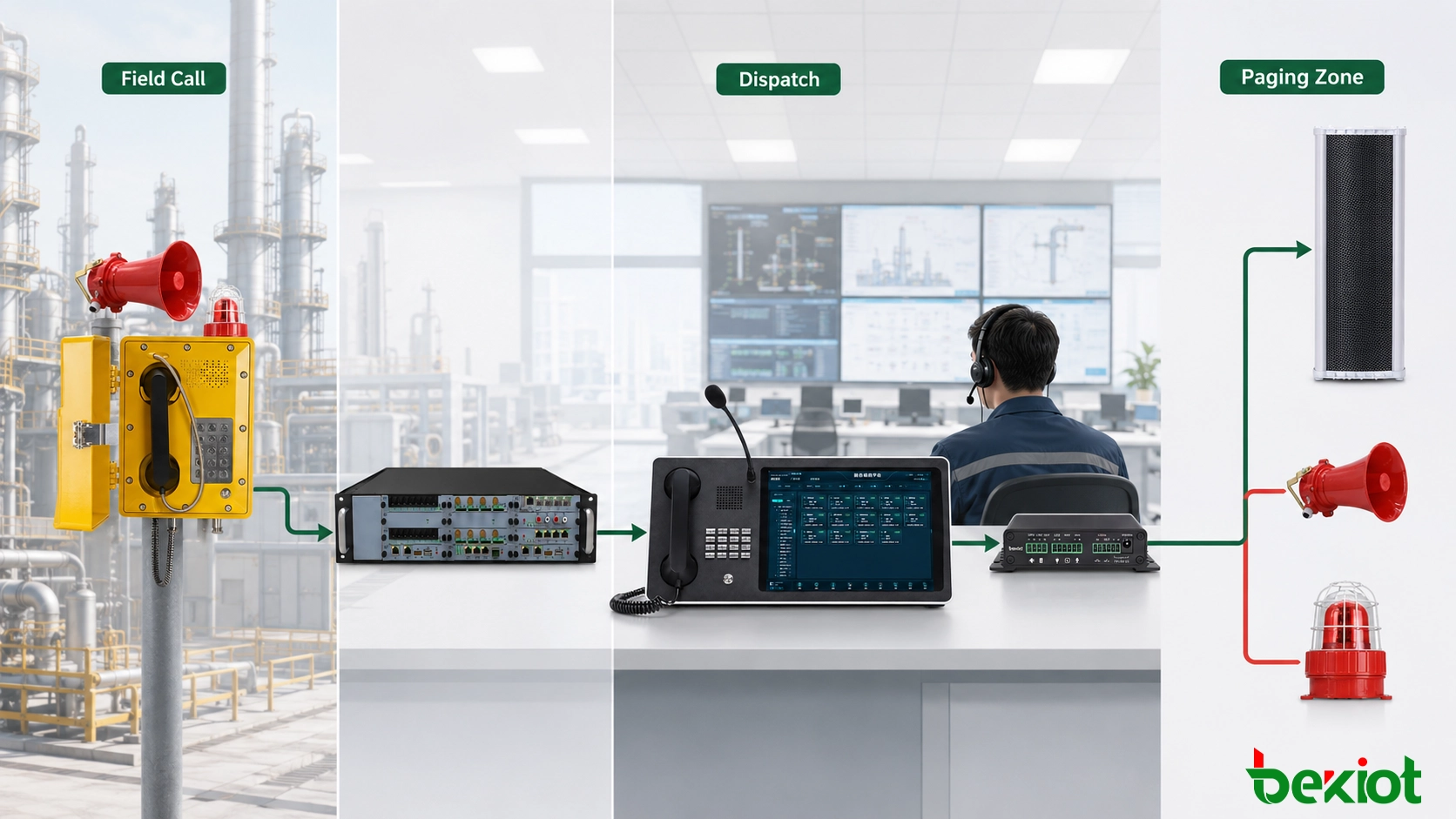
Explosion-proof telephone → industrial network or field telephone line → switch or voice gateway → unified communications platform → dispatch console, duty-room telephone and paging system
Building-to-building connections require additional consideration. Long copper runs may be exposed to lightning, electromagnetic interference and differences in ground potential. Where practical, fiber can be used for the plant backbone, with copper Ethernet or telephone wiring limited to the final field connection. Cable routing, grounding, surge protection and mechanical protection should remain consistent with the electrical design for the site.
Select the Appropriate Access Architecture
Direct SIP Registration
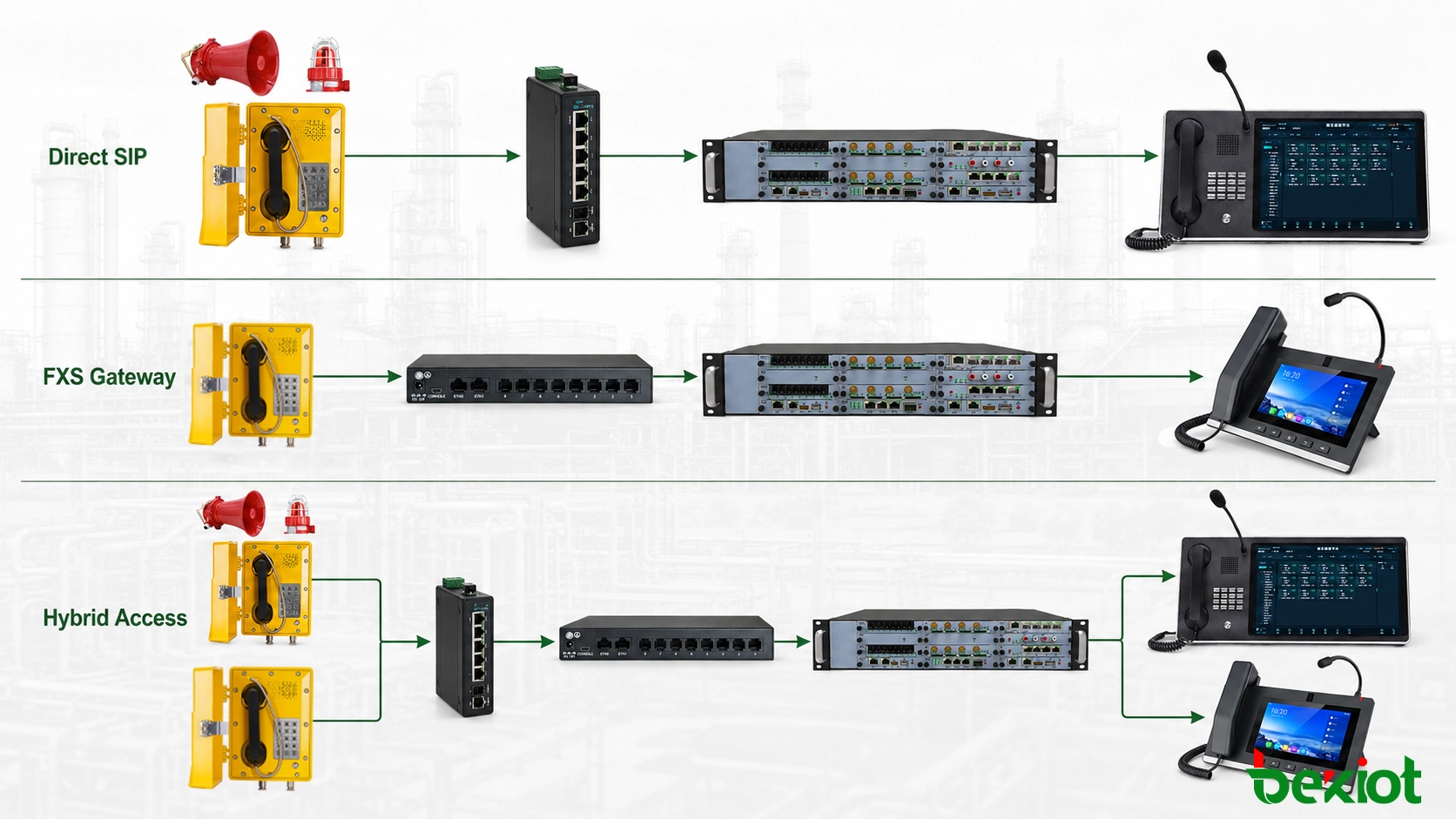
In a new installation with industrial Ethernet coverage, a SIP explosion-proof telephone can connect to an industrial switch and register directly with an IP PBX, SIP server or unified communications platform. The platform assigns an extension and applies the required permissions, call destinations, recording policy and failover rules.
Direct registration reduces the number of protocol-conversion stages and allows endpoint status, network addresses and call records to be managed centrally. Additional telephones can usually be introduced through network and account configuration without installing a dedicated analog pair from every field location back to the equipment room.
A SIP endpoint such as the EX-BH621 can be used as a field extension in this architecture. Its suitability for the installation area, power method and network interface must still be checked against the project conditions and current product documentation.
If the endpoint uses network power, the design should record the switch power budget, cable length and backup-power arrangement. Where a separate power source is used, the power and data routes should be documented independently so that an offline endpoint can be diagnosed without opening unrelated equipment.
Analog Access Through an FXS Gateway
Many existing plants continue to use analog explosion-proof telephones and field telephone cables. If the telephones and lines remain serviceable, they can be connected to the FXS ports of a voice gateway. The gateway then presents the analog lines to the IP PBX or communications platform as SIP extensions.
Analog explosion-proof telephone → field telephone cable → FXS voice gateway → unified communications platform
Gateway conversion is useful when a project needs to retain installed field equipment and limit the scope of immediate replacement. The gateway converts the interface, but it cannot correct insulation faults, moisture ingress, corroded terminals or electrical interference on the field circuit. Line condition, loop length and termination quality should therefore be checked before integration.
Each FXS port should be assigned to a fixed field endpoint and location. If a port or line is moved, the gateway map, extension record, dispatch label and as-built drawing must be updated together. Otherwise, the location shown at the dispatch console may no longer match the actual calling point.
Hybrid Deployment
Large industrial sites are often upgraded one area at a time. Existing process units may retain analog telephones, while new buildings and expanded production areas use SIP endpoints. Both types can operate through one communications platform when analog lines connect through FXS gateways and IP endpoints register directly.
Access Method
Field Connection
Main Equipment
Typical Use
Direct SIP
Industrial Ethernet
Industrial switch and communications platform
New installations or areas with suitable network coverage
Gateway conversion
Analog telephone cable
FXS voice gateway and communications platform
Retrofit projects retaining existing field equipment
Hybrid network
Ethernet and analog lines
Industrial switches, voice gateways and communications platform
Phased modernization across a large site
A hybrid design must show where interface conversion takes place. Drawings should identify which areas use direct SIP access, which retain analog lines, where the gateways are installed, and which local communication services must remain available if the central platform or wide-area network becomes unavailable.
Direct SIP, FXS gateway and hybrid access can be selected according to the installed network and field cabling.
Build Numbering and Routing Around Physical Locations
After a telephone is connected, the platform should associate its extension with a physical location. Displaying only an extension such as “8001” provides limited operational value. The dispatch interface should also show a practical location name such as “Tank Farm East,” “Loading Bay 2” or “Utility Pump Room.”
Multi-building or multi-site systems can use a numbering plan that combines a site prefix, area code and endpoint number. Separate ranges may be assigned to the tank farm, loading area, production units and utility buildings. This structure helps operators identify the source of a call and allows maintenance personnel to trace the corresponding switch port, gateway channel and field circuit.
Call routing should follow the duty schedule rather than sending every field telephone to one destination. Common routing policies include:
Routing field calls first to the dispatch position responsible for that area;
Forwarding unanswered calls to a duty group or backup operator;
Ringing several dispatch positions simultaneously;
Assigning separate destinations or priorities to emergency call points;
Recording selected calls with the calling number, time and answering position.
Busy, unanswered and offline conditions also require defined handling. Sequential routing, simultaneous ringing and backup numbers produce different operational results. The selected method should reflect site responsibilities rather than the default behavior of the call platform.
For a multi-site deployment, the design should also state what happens during a wide-area network failure. If local telephones must continue calling a nearby duty room when the central platform is unreachable, that local path needs to be included in the architecture and verified during acceptance testing.
Connect Field Calls with Dispatch and Paging
Telephones and paging systems perform different functions. A telephone provides two-way communication between a field user and an operator. A paging system distributes live or recorded audio to one or more zones. A unified platform can connect the two workflows without treating them as the same service.
Operator-Confirmed Paging
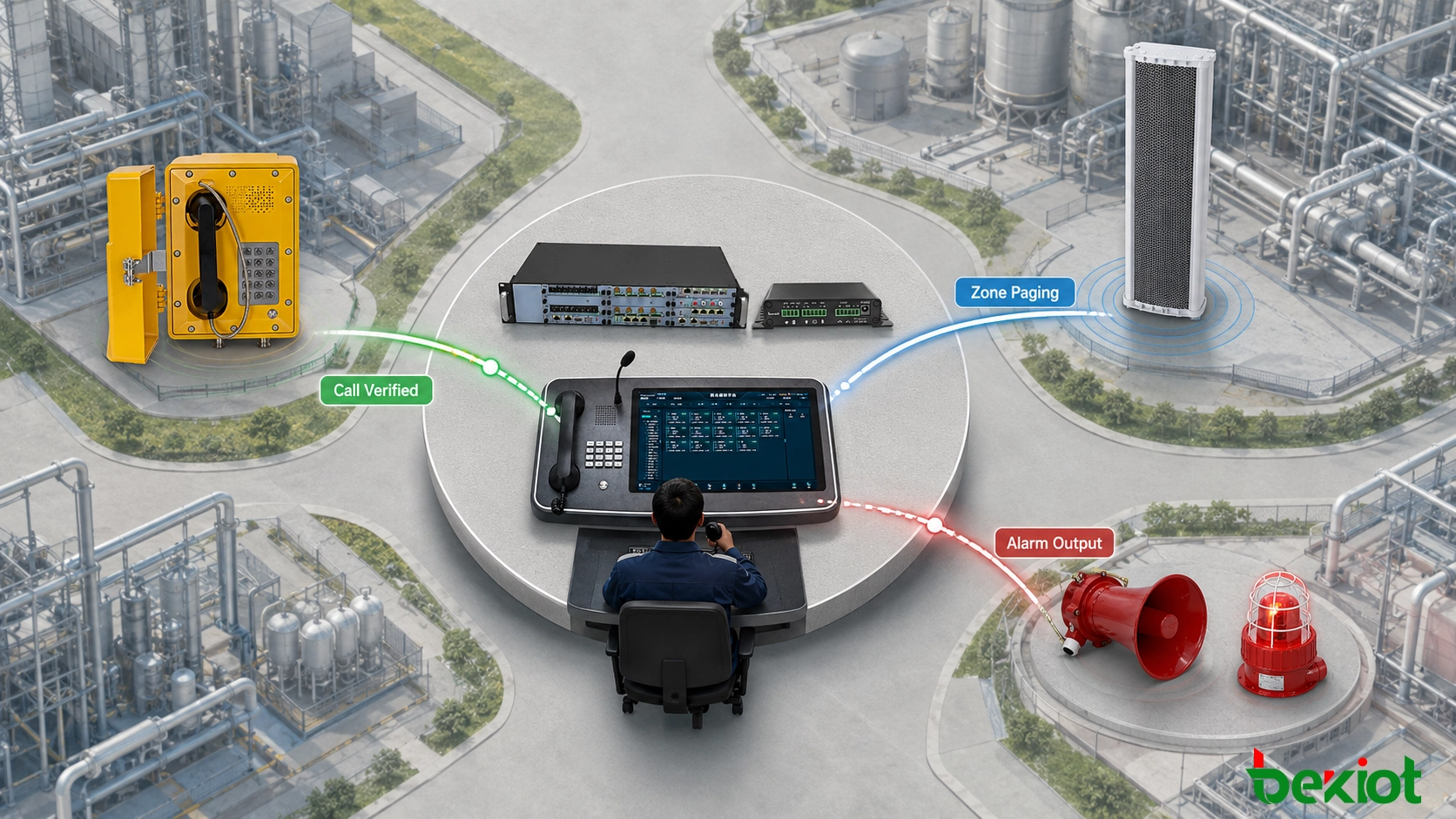
A field user calls the control room and reports the event location and current conditions. The operator confirms the information using the caller identity and displayed location, then selects the required paging zone from the dispatch console.
Operator confirmation is suitable for production incidents that need verification before a wider announcement is issued. The operator can select one zone, several adjacent zones or an all-site group according to the actual affected area.
Paging Through Dedicated Extensions
The platform can assign a paging extension to each building, production area or all-call group. An authorized operator calls the required extension, and the audio is delivered through a paging gateway, SIP speaker or existing PA system.
Paging destinations should have clear permissions, pre-announcement behavior, busy handling and release rules. Site-wide groups should not be available to every ordinary extension. When a zone is already in use, the platform must define whether the second request is rejected, queued or allowed to interrupt the active announcement according to its priority.
Alarm-Triggered Messages and Visual Alerts
Alarm controllers and third-party systems may send events to the communications platform through a supported interface. The platform can then select an assigned destination and request playback of a recorded message or operation of a visual or audible warning device.
Field call or alarm event → source and permission check → operator confirmation or platform rule → zone selection → live or recorded audio → release and status recovery
A verified field call can be escalated through the dispatch platform to a selected paging or alarm zone.
Automated actions should identify the trigger source, interface, message storage location, destination zones, priority and reset condition. A high-priority setting on the call platform does not automatically override another source at the PA amplifier. The paging gateway, PA controller and amplifier must support the intended priority or mute behavior across the complete audio path.
Where paging is expected to perform a fire alarm or other life-safety function, the complete system must be assessed under the applicable project and regulatory requirements. Telephone and paging integration does not by itself convert a general-purpose communication system into a compliant emergency voice alarm system.
Plan Voice Quality and Service Continuity Together
A registered SIP endpoint is not proof that the voice path is operating correctly. SIP normally handles registration, call establishment and call release, while RTP carries the media stream. A telephone can therefore appear online while calls still experience silence, one-way audio or intermittent speech.
Communication Stage
Main Function
Typical Fault
SIP registration
Associates the endpoint with the platform
Authentication failure, timeout or repeated registration loss
Call routing
Selects a destination and applies permissions
Rejected calls, incorrect forwarding or routing loops
Media negotiation
Agrees on codecs and media addresses
No audio, one-way audio or codec incompatibility
Network transport
Carries signaling and voice packets
Delay, jitter, packet loss or intermittent speech
Voice devices may be placed in a dedicated VLAN where appropriate, with access control and quality-of-service policies applied across the actual communication path. Testing should be performed under representative production traffic rather than only on an unloaded network. Calls crossing shared uplinks or wide-area links require particular attention to end-to-end delay, jitter, packet loss and routing stability.
Codec planning should remain consistent across telephones, gateways, IP PBX servers, dispatch consoles and recording systems. Unnecessary transcoding consumes platform resources and may add delay. Where analog and SIP endpoints share the same call route, the media settings should be checked at the gateway as well as at the central platform.
Availability planning should cover the complete communication chain:
Whether field telephones and industrial switches require backup power;
Whether one switch failure can disconnect an entire production area;
How gateway and endpoint faults are reported to operators;
Whether the communications platform requires redundancy or backup registration;
Whether a duty-room telephone can receive calls if the dispatch console fails;
Whether local calling remains available during a wide-area network outage;
Which alternative notification method is used if the paging system is unavailable.
Dual-server operation, backup registration, redundant network paths and offline message playback are not automatically available on every device. Each protection mechanism should be confirmed against the selected hardware, software version and licensing arrangement before it is included in the final design.
Primary and backup paths should be tested under defined network, power and platform failure conditions.
Commission the Complete Operating Sequence
One successful call does not demonstrate that the system is ready for operation. Acceptance testing should follow the complete workflow from the field telephone to the operator, paging destination and recovery process.
Verify endpoint records. Confirm the extension, device name, installation location, switch port or gateway channel for every telephone.
Test calls in both directions. Place calls from the field to the dispatch console, return calls from the console and verify communication with the duty-room telephone.
Confirm location display. The location shown at the dispatch interface should match the field label and as-built drawing.
Evaluate speech under operating noise. Check intelligibility, listening level, delay, one-way audio and intermittent speech while nearby equipment is running.
Verify every paging destination. Test individual zones, paging groups and all-call functions, confirming that audio does not reach unselected areas.
Test busy and priority conditions. Confirm the expected behavior when a zone is occupied or a higher-priority request is received.
Interrupt network and power paths. Record which services stop, which remain available and whether endpoints recover automatically.
Review system records. Compare call logs, recordings and alarm timestamps to confirm consistent system time.
After acceptance, the project records should include endpoint accounts, numbering plans, gateway port maps, network addresses, paging groups, call routes and software versions. These records provide a controlled baseline for later expansion, troubleshooting and configuration changes.
A deployable system should allow a field call to reach the correct operator with an accurate location label, support paging or alarm escalation according to an approved procedure, and recover predictably after the defined network or equipment failures.
Becke Telecom provides industrial communication equipment and integration support for hazardous and demanding environments, including explosion-proof telephones such as the EX-BH621, industrial telephones, voice gateways, IP PBX systems, paging gateways and dispatch terminals. These components can be combined according to the site network, existing cabling and operating procedure, without forcing every project into the same access architecture.
Becke Telcom specializes in industrial explosion-proof comms for rail, tunnel, oil & gas, and marine sectors, offering PAGA, SOS, and IP telephones with integrated PA, intercom, and calling.
If you have any suggestions or questions for us, please feel free to contact us!
We use cookie to improve your online experience. By continuing to browse this website, you agree to our use of cookie.
Cookies
Please read our Terms and Conditions and this Policy before accessing or using our Services. If you cannot agree with this Policy or the Terms and Conditions, please do not access or use our Services. If you are located in a jurisdiction outside the European Economic Area, by using our Services, you accept the Terms and Conditions and accept our privacy practices described in this Policy. We may modify this Policy at any time, without prior notice, and changes may apply to any Personal Information we already hold about you, as well as any new Personal Information collected after the Policy is modified. If we make changes, we will notify you by revising the date at the top of this Policy. We will provide you with advanced notice if we make any material changes to how we collect, use or disclose your Personal Information that impact your rights under this Policy. If you are located in a jurisdiction other than the European Economic Area, the United Kingdom or Switzerland (collectively “European Countries”), your continued access or use of our Services after receiving the notice of changes, constitutes your acknowledgement that you accept the updated Policy. In addition, we may provide you with real time disclosures or additional information about the Personal Information handling practices of specific parts of our Services. Such notices may supplement this Policy or provide you with additional choices about how we process your Personal Information.
Cookies
Cookies are small text files stored on your device when you access most Websites on the internet or open certain emails. Among other things, Cookies allow a Website to recognize your device and remember if you've been to the Website before. Examples of information collected by Cookies include your browser type and the address of the Website from which you arrived at our Website as well as IP address and clickstream behavior (that is the pages you view and the links you click).We use the term cookie to refer to Cookies and technologies that perform a similar function to Cookies (e.g., tags, pixels, web beacons, etc.). Cookies can be read by the originating Website on each subsequent visit and by any other Website that recognizes the cookie. The Website uses Cookies in order to make the Website easier to use, to support a better user experience, including the provision of information and functionality to you, as well as to provide us with information about how the Website is used so that we can make sure it is as up to date, relevant, and error free as we can. Cookies on the Website We use Cookies to personalize your experience when you visit the Site, uniquely identify your computer for security purposes, and enable us and our third-party service providers to serve ads on our behalf across the internet.
We classify Cookies in the following categories: ● Strictly Necessary Cookies ● Performance Cookies ● Functional Cookies ● Targeting Cookies
Cookie List A cookie is a small piece of data (text file) that a website – when visited by a user – asks your browser to store on your device in order to remember information about you, such as your language preference or login information. Those cookies are set by us and called first-party cookies. We also use third-party cookies – which are cookies from a domain different than the domain of the website you are visiting – for our advertising and marketing efforts. More specifically, we use cookies and other tracking technologies for the following purposes:
Strictly Necessary Cookies These cookies are necessary for the website to function and cannot be switched off in our systems. They are usually only set in response to actions made by you which amount to a request for services, such as setting your privacy preferences, logging in or filling in forms. You can set your browser to block or alert you about these cookies, but some parts of the site will not then work. These cookies do not store any personally identifiable information.
Functional Cookies These cookies enable the website to provide enhanced functionality and personalisation. They may be set by us or by third party providers whose services we have added to our pages. If you do not allow these cookies then some or all of these services may not function properly.
Performance Cookies These cookies allow us to count visits and traffic sources so we can measure and improve the performance of our site. They help us to know which pages are the most and least popular and see how visitors move around the site. All information these cookies collect is aggregated and therefore anonymous. If you do not allow these cookies we will not know when you have visited our site, and will not be able to monitor its performance.
Targeting Cookies These cookies may be set through our site by our advertising partners. They may be used by those companies to build a profile of your interests and show you relevant adverts on other sites. They do not store directly personal information, but are based on uniquely identifying your browser and internet device. If you do not allow these cookies, you will experience less targeted advertising.
How To Turn Off Cookies You can choose to restrict or block Cookies through your browser settings at any time. Please note that certain Cookies may be set as soon as you visit the Website, but you can remove them using your browser settings. However, please be aware that restricting or blocking Cookies set on the Website may impact the functionality or performance of the Website or prevent you from using certain services provided through the Website. It will also affect our ability to update the Website to cater for user preferences and improve performance. Cookies within Mobile Applications
We only use Strictly Necessary Cookies on our mobile applications. These Cookies are critical to the functionality of our applications, so if you block or delete these Cookies you may not be able to use the application. These Cookies are not shared with any other application on your mobile device. We never use the Cookies from the mobile application to store personal information about you.
If you have questions or concerns regarding any information in this Privacy Policy, please contact us by email at . You can also contact us via our customer service at our Site.

 English
 Deutsch
 한국어
한국어 Русский
 Français
 日本語
日本語 لالعربية
 हिन्दी
 Español
 Português
 繁体中文
繁体中文 简体中文
简体中文