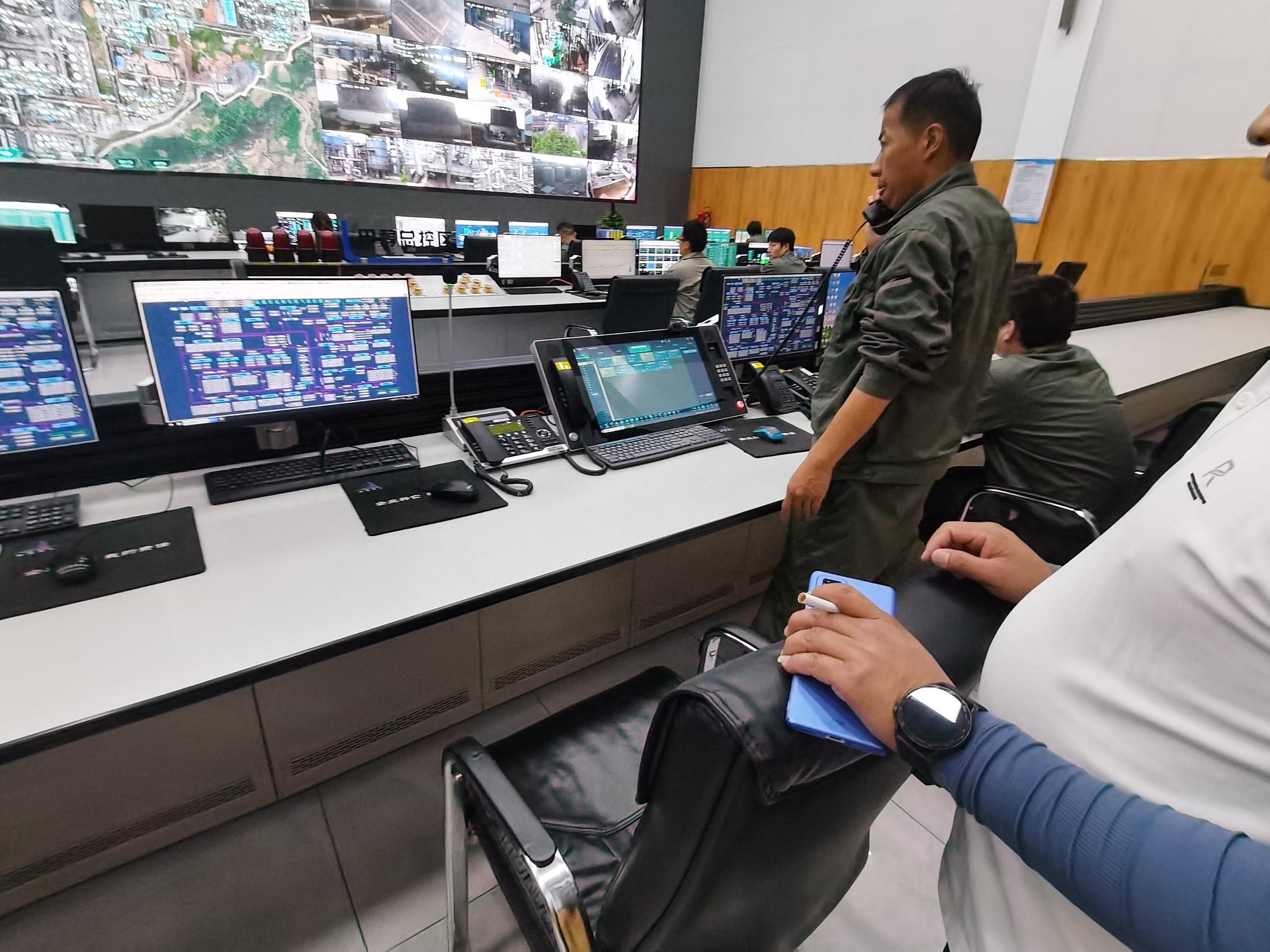
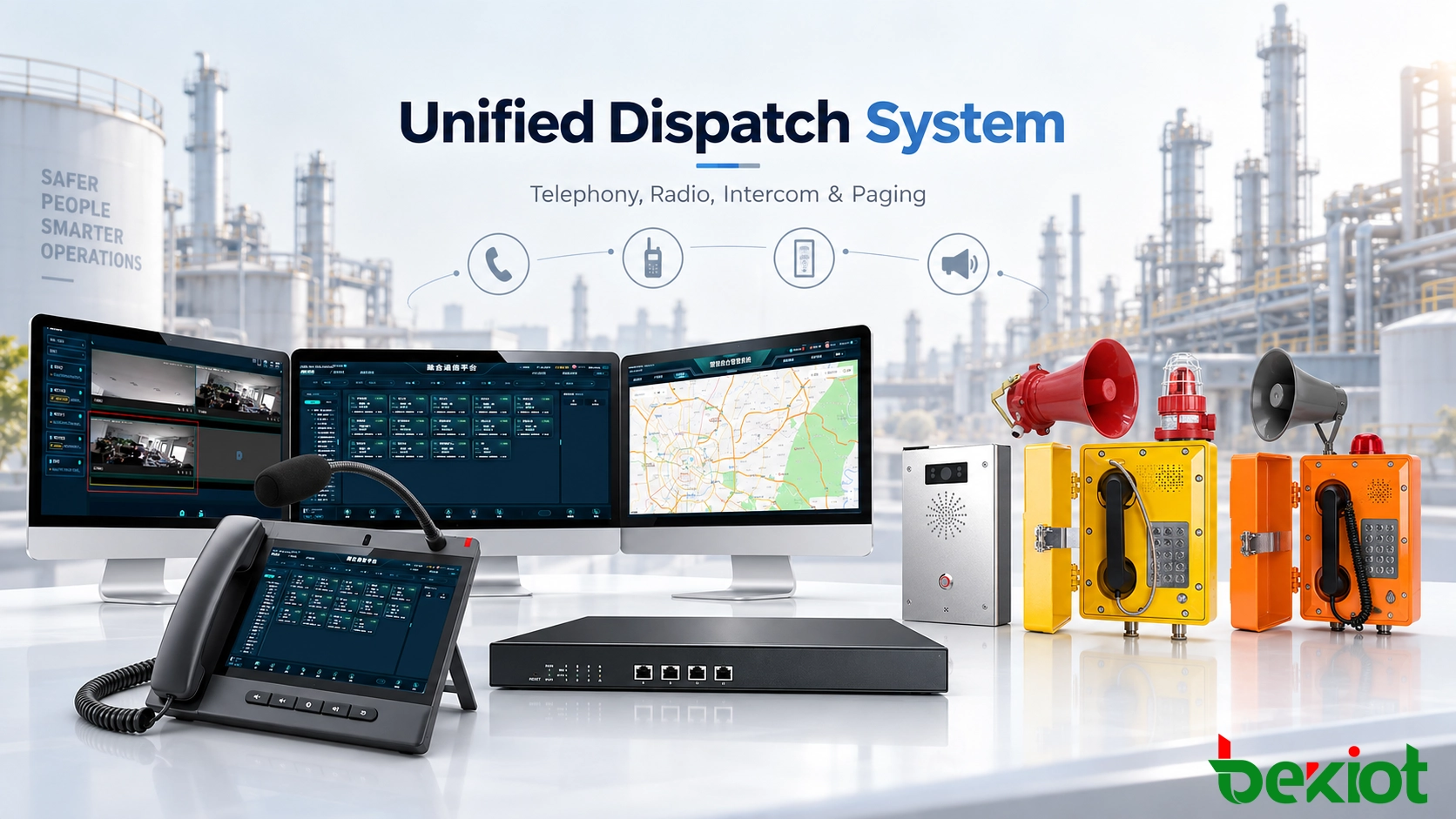
An industrial plant, transport control center or emergency operations room rarely depends on one communication network. Fixed workstations may use SIP phones, hazardous areas may require explosion-proof telephones, field personnel rely on radios, and production zones may also include paging speakers, intercom stations, CCTV cameras and alarm devices.
Problems appear when one event requires several of these systems at the same time. A dispatcher responding to a gas alarm, equipment failure or security incident may need to identify the location, contact nearby personnel, reach a radio group, view a camera and broadcast instructions to the affected area. If each resource remains isolated, the operator must move between different consoles, contact lists and software platforms.
A unified dispatch system brings these resources into a common operational environment through SIP, IP networking, RoIP gateways, media interfaces and application integration. Existing equipment does not necessarily need to be replaced. The first objective is to determine how each communication resource can be connected, controlled and associated with the workflow used by the control room.
Why Communication Systems Remain Isolated
Sharing the same Ethernet network does not mean that different communication systems can operate together. SIP telephones, radio systems, public address equipment, cameras and alarm devices use different signaling, addressing and control methods.
A SIP telephone typically registers to an IP PBX or communication server. SIP handles call establishment and routing, while voice is carried as IP media. A radio channel has different requirements: transmit and receive audio, PTT control and receive-status detection may all need to be exchanged with the dispatch platform. A paging system focuses on zones, priorities and audio distribution, while CCTV and alarm systems work with camera IDs, event IDs, locations and application data.
Integration can therefore occur at several different levels:
| Integration Layer | Typical Functions | Examples |
|---|
| Signaling | Registration, call setup, routing | SIP, SIP trunk |
| Media | Voice and audio transport | RTP, audio interfaces |
| Control | Transmit, receive and device control | PTT, COR, I/O, paging priority |
| Application | Events, locations and resource linkage | API, GIS, VMS, alarm integration |
This explains why some devices can register directly through SIP, some require a gateway, and others must be integrated through an API or dedicated platform interface.
A conventional telephone system mainly manages extensions, trunks and calls. Unified dispatch extends this model to radio channels, paging zones, cameras, alarm points, GIS locations and third-party operational resources.
Unified Dispatch Architecture
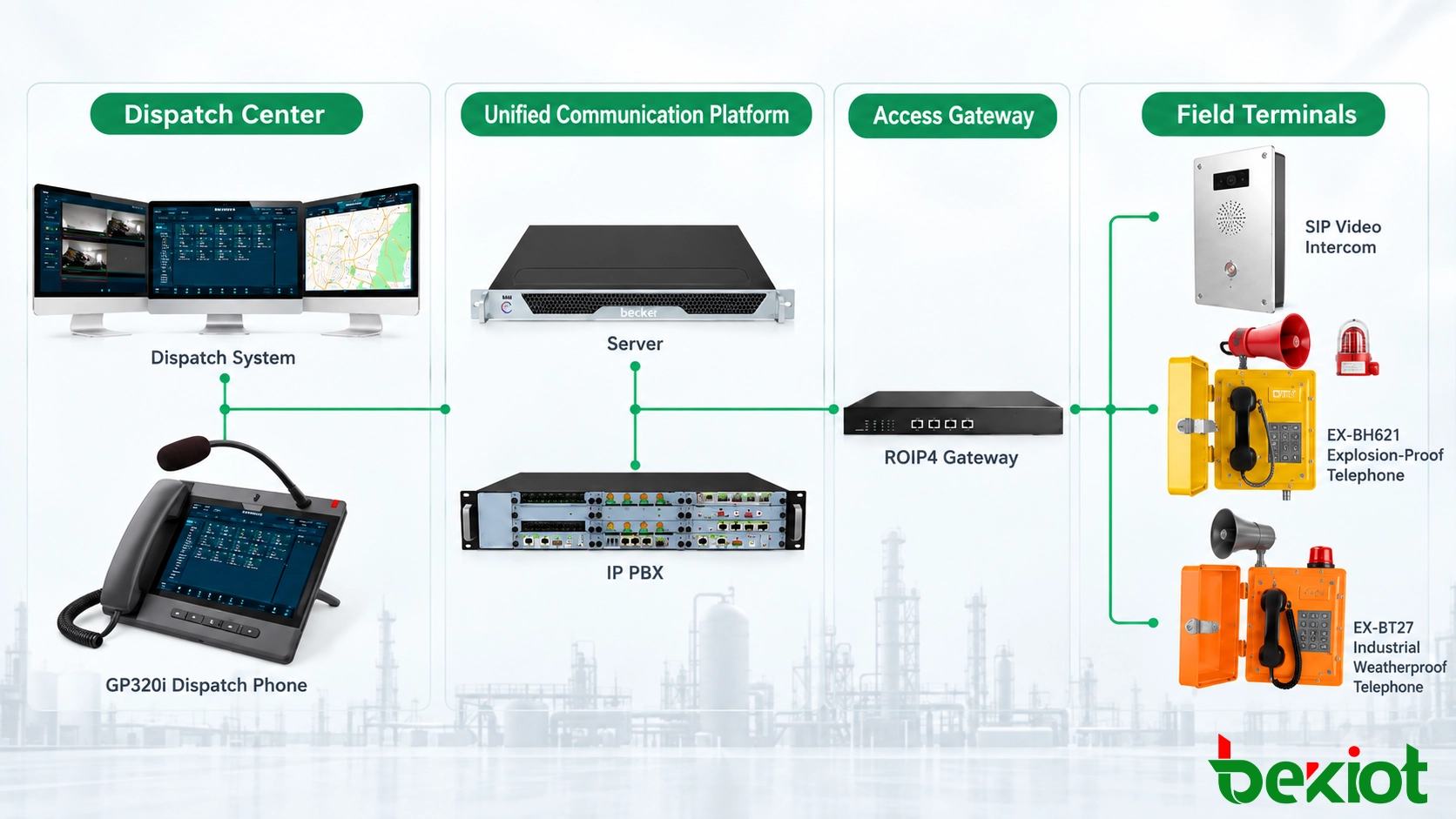
A practical system is usually organized into four parts: the dispatch layer, communication core, access layer and field resources. The number of servers and gateways changes with project size, but the communication logic remains similar.
Dispatch Layer
The dispatch layer is where operators work. It can combine dispatch software, desktop consoles, paging consoles, GIS, video windows, communication groups and event information.
Resources should be presented according to operational meaning rather than only by device number. An operator may select Maintenance Team, Radio Channel 2, Tank Area Paging or East Gate Intercom without first determining which underlying platform owns the resource.
Communication Core
The core platform handles SIP registration, numbering, call routing, conferencing, permissions and media services. Depending on capacity and reliability requirements, the system may include an IP PBX, unified communication server, dispatch server and recording service.
SIP phones, dispatch telephones and compatible intercom terminals can register directly. Other systems reach the core through gateways or application-level interfaces.
Access Layer
The access layer converts communication resources that cannot connect directly to the IP dispatch environment. RoIP gateways connect radio channels, voice gateways can retain analog telephones or legacy PBX resources, and paging interfaces can connect existing public address infrastructure.
For retrofit projects, this layer is often more important than the dispatch interface itself. Existing equipment should first be checked for usable interfaces before replacement is considered.
Field Resources
Field resources may include IP phones, industrial telephones, explosion-proof telephones, SIP intercoms, paging speakers, audio columns, handheld radios, mobile radios, cameras and alarm devices.
Unified dispatch does not remove the need to select terminals for the actual operating environment. Hazardous zones still require suitable explosion-protected equipment, while exposed outdoor areas may require weather-resistant industrial terminals.
Telephone and SIP Integration
SIP-based terminals are generally the easiest resources to integrate. IP phones, dispatch telephones and SIP intercoms can register to the communication platform using individual accounts or extensions. The platform then manages routing, permissions and communication groups.
The same environment can support direct calls, group communication, transfers and conference functions without requiring a separate control interface for every terminal type.
Existing Telephone Systems
Facilities with analog telephones or an existing PBX do not necessarily need a complete replacement. Analog users can be connected through FXS gateways, while an existing PBX may connect through a SIP trunk or voice gateway if compatible interfaces are available.
Number planning becomes important when old and new systems coexist. Extension ranges, route priorities and concurrent channels should be defined before cutover so that users on either side can reach the required destinations without numbering conflicts.
A unified dispatch project can therefore be introduced gradually. New SIP terminals may be deployed in areas where additional functions are required, while serviceable legacy telephones remain connected through appropriate gateways.
Radio Integration Through RoIP
Radio integration differs from ordinary SIP telephony because the dispatch platform must control more than voice. It needs a way to activate radio transmission and determine when a radio channel is receiving traffic.
A RoIP gateway sits between the radio equipment and the IP network. The radio side typically carries transmit audio, receive audio and control signals such as PTT and COR. The network side transports the required audio and control information toward the dispatch system.
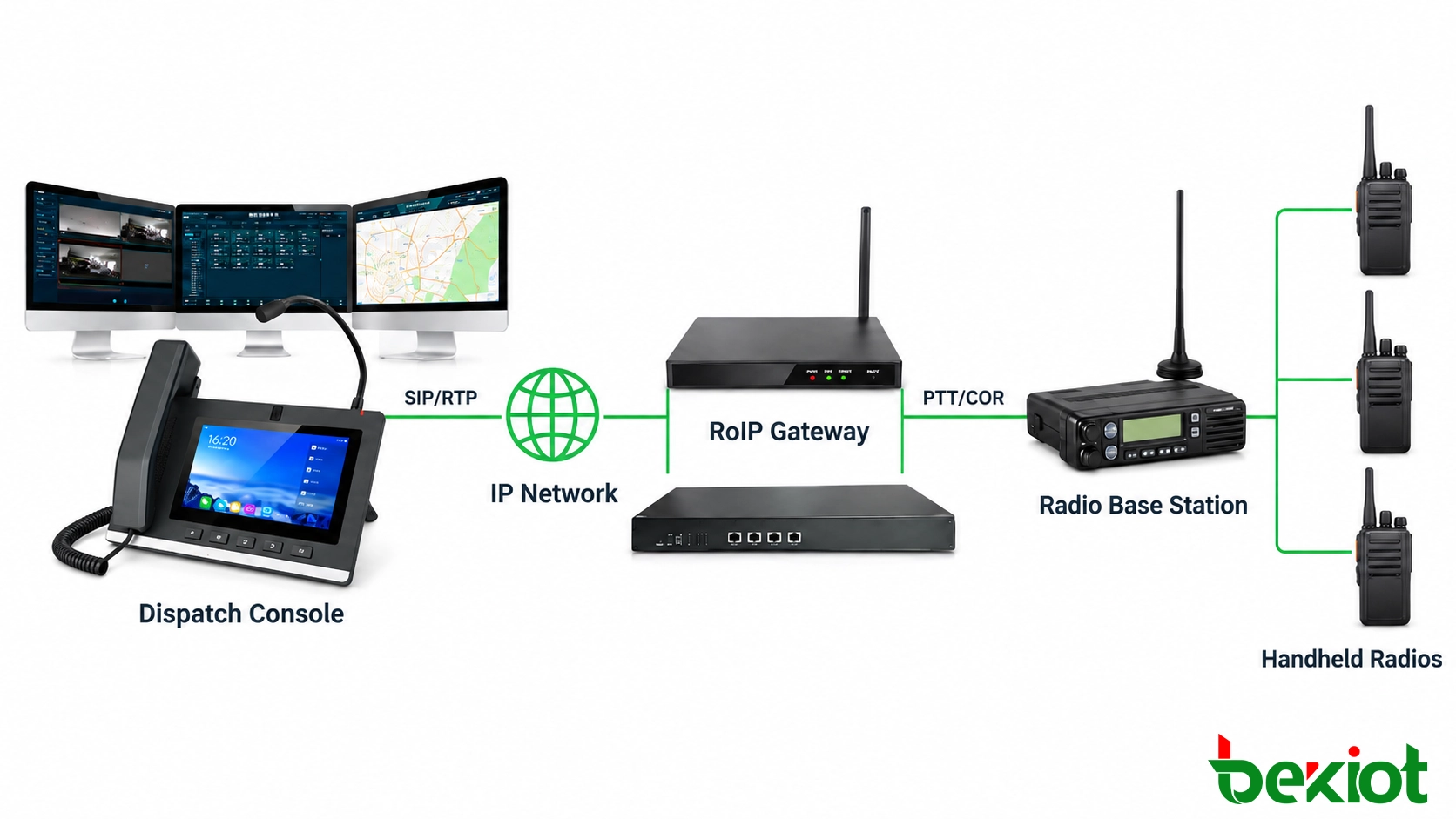
A simplified path is:
Dispatch Console → IP Network → RoIP Gateway → Radio Base Station → Handheld Radios
Once connected, the radio channel can be represented as a dispatch resource. The operator can select a production, maintenance, security or emergency channel from the dispatch interface without operating an independent radio console.
Multi-channel RoIP gateways can connect several radio resources while keeping each channel individually identifiable within the platform. Single-channel and multi-channel gateways can then be selected according to the number of radio interfaces required at each site.
Radio Interface Requirements
The radio connection should be checked before deployment. Important parameters include the audio interface, transmit and receive levels, PTT control method, COR or receive detection and channel behavior.
Audio transport alone does not create a complete dispatch connection. A system may pass received voice successfully while still failing to transmit if PTT control has not been configured correctly.
Network performance also matters. Excessive delay, jitter or packet loss can affect the usability of push-to-talk communication, particularly when radio resources are connected across remote IP links.
Related Solution: Radio Dispatch System
PA, Video and Alarm Integration
Public address, video and alarm systems should not simply be added to the dispatch screen as separate applications. Their value increases when each resource is associated with a physical area, device or operational event.
Public Address
SIP paging devices can connect through the IP communication environment, while conventional amplifiers and speaker networks may require an audio or paging gateway.
Speakers are normally organized into operational zones such as Production Area, Warehouse, Loading Bay or Outdoor Yard. The dispatcher selects a zone instead of addressing each loudspeaker separately.
Paging priority should also be defined. Routine announcements, operational messages and emergency instructions may require different priority levels so that critical communication is not blocked by lower-priority audio.
Video Integration
CCTV integration works through resource association rather than telephone-style registration. A camera can be linked to an entrance, production unit, alarm zone or field terminal.
When an intercom call or alarm is received, the platform can present the relevant camera automatically or provide direct access to the corresponding video feed. Operators no longer need to search a large camera list before checking the affected area.
Alarm Integration
Gas detectors, emergency buttons, fire alarm systems and third-party monitoring platforms can provide event information through APIs, digital I/O or other supported interfaces.
The platform should identify the event type, source and location. These values are then used to find the communication resources associated with the same area.
For example, Tank Area A might be linked to:
- an explosion-proof telephone;
- a maintenance radio channel;
- the local paging zone;
- nearby CCTV cameras;
- a gas detection point;
- the responsible operations team.
The platform is therefore not simply displaying multiple systems together. It establishes a relationship between an incident and the communication resources required to respond to it.
Event-Driven Dispatch
Event-driven dispatch turns resource integration into an operating workflow. Instead of starting with a device list, the dispatcher starts with the incident.
Consider a gas alarm in a process area. The alarm system sends an event with a location or equipment identifier. The dispatch platform uses the identifier to retrieve the related GIS location, cameras, telephone terminals, radio channel, paging zone and responsible personnel.
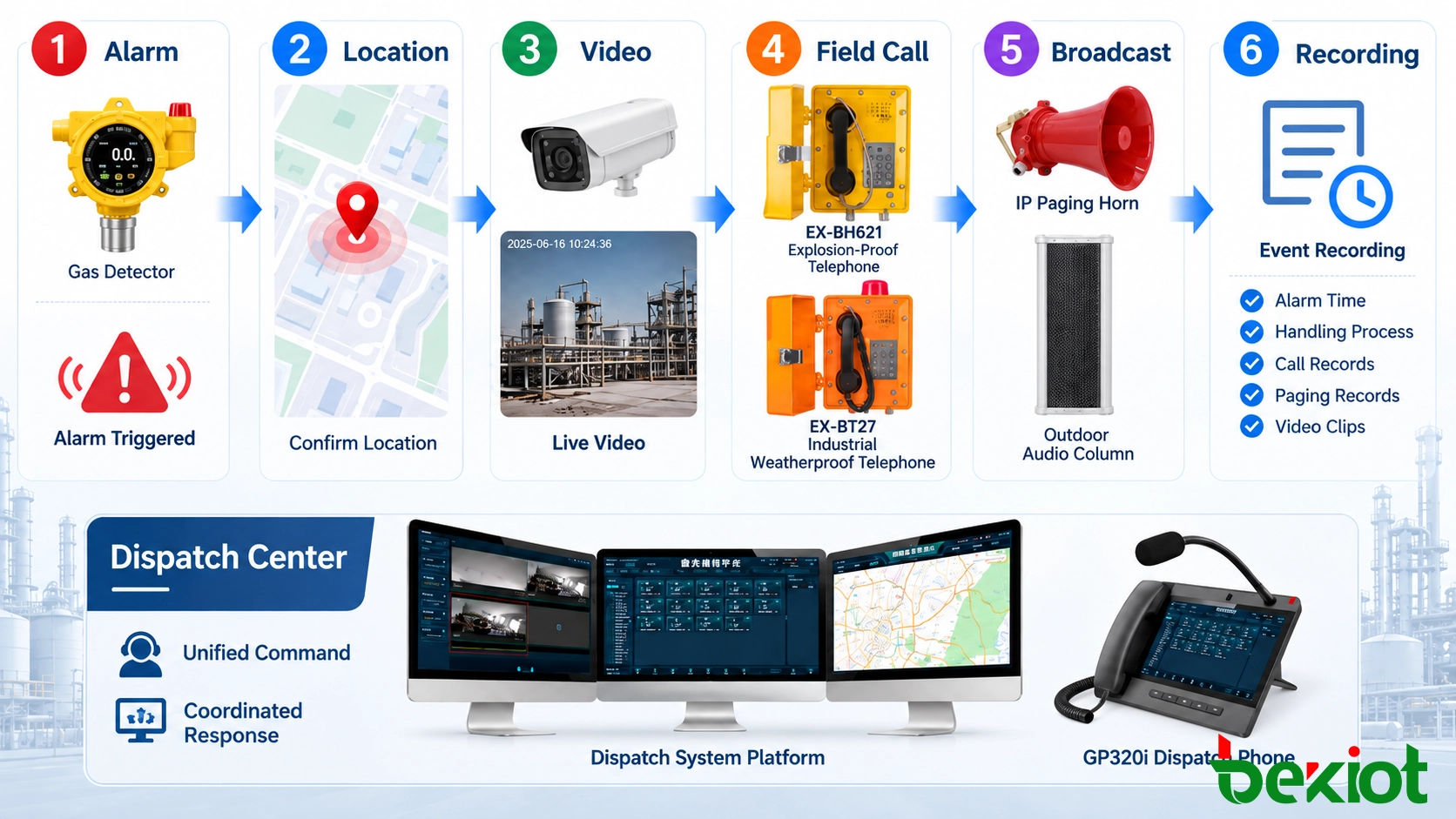
A typical sequence can be:
Alarm → Location → Video Verification → Field Call → Zone Paging → Coordination → Recording
The operator can first verify the affected area through video, then contact nearby personnel through an industrial telephone or radio channel. If the incident expands, additional teams can be brought into a temporary communication group or conference. Instructions can then be broadcast only to the relevant paging zone.
Calls, dispatch actions and communication records can be associated with the event for later review.
Automation should be applied according to operational risk. The platform can automatically locate an event, display associated resources and prepare communication actions. Critical instructions, evacuation messages or production-related decisions can remain subject to operator confirmation.
This balance is especially important in industrial and emergency environments, where faster access to information is useful but operational authority still needs to remain clear.
Integration and Deployment Planning
System design should begin with the existing communication environment rather than with a predetermined server or console model. The first task is to identify what is already installed, which interfaces are available and which resources actually need to communicate with each other.
| Resource | Planning Points |
|---|
| SIP Devices | Quantity, accounts, codecs, concurrent calls |
| Analog Phones | FXS ports, numbering, existing cabling |
| Existing PBX | SIP trunk, routing, concurrent channels |
| Radio | Radio type, channel quantity, audio, PTT and COR |
| Public Address | Zones, priorities, SIP or analog interfaces |
| CCTV | Camera IDs, locations, VMS interfaces |
| Alarms | Event types, locations, API or I/O interfaces |
| Dispatch | Operator positions, permissions, backup positions |
| Recording | Channels, retention period, storage capacity |
| Network | VLAN, QoS, WAN links and redundancy |
Resource Mapping
After interfaces have been confirmed, resources should be organized by how they are used. A large site may have hundreds of extensions, several radio channels, multiple paging zones and many cameras. Presenting all of them as a flat device list would make dispatch operation slower.
Resources can instead be grouped by department, site, operational area, job role, radio group, paging zone or incident type. A maintenance telephone may belong to the Maintenance Department during routine work and also appear in an Emergency Response group when a major event occurs.
Reliability
As more communication functions depend on the IP environment, network and server availability become part of the communication design. Critical projects may need redundant servers, backup dispatch positions, UPS power, resilient switching and alternative communication paths.
Multi-site systems should also evaluate WAN latency, packet loss and what happens when a remote link is unavailable. Local communication should remain available where the operational requirement calls for continued site-level operation during a WAN failure.
VLAN and QoS policies can be used to separate or prioritize critical voice and dispatch traffic when the same network also carries video, office data or other high-volume applications.
For an existing site, a practical implementation sequence is:
Existing Resources → Interface Review → Network Integration → Resource Mapping → Dispatch Workflow
This sequence avoids replacing equipment simply because it belongs to an older system. Devices with suitable interfaces can remain in service, while gateways and application integration gradually establish a common IP-based dispatch environment.
A unified dispatch system is therefore not defined by the number of communication functions displayed on one screen. Its value comes from connecting resources that previously worked independently and making them available according to location, role and event.
For system planning, Becke Telcom can evaluate existing telephone systems, radio channels, paging zones, alarm interfaces, network conditions and dispatch positions before determining the required IP PBX, RoIP gateway, dispatch console and field-terminal configuration. For complex projects, the first questions remain practical: which systems should be retained, which resources need to communicate, and what communication workflow should begin when an event occurs?

 English
 Deutsch
 한국어
한국어 Русский
 Français
 日本語
日本語 لالعربية
 हिन्दी
 Español
 Português
 繁体中文
繁体中文 简体中文
简体中文