In modern system integration projects, reliable cross-network communication is a cornerstone of seamless operation for various services—from web hosting and video surveillance to video conferencing and ROIP gateway connectivity. However, a common challenge arises when internal devices, assigned private IP addresses, need to interact with external networks. Private IPs are not routable on the public internet, creating a barrier that prevents legitimate external access to internal resources. This is where IP address port mapping (also known as port forwarding) comes into play, serving as a critical networking technology that bridges public and private networks.
As a trusted solution in industrial, commercial, and enterprise environments, IP address port mapping is essential for deploying services like web servers, video management systems, and ROIP gateways—all core to Becke Telcom’s integrated networking offerings. This article delves into the core concepts, working principles, practical use cases, and key benefits of IP address port mapping, emphasizing its role in optimizing network resources and enabling flexible, secure cross-network communication.
What Is IP Address Port Mapping?
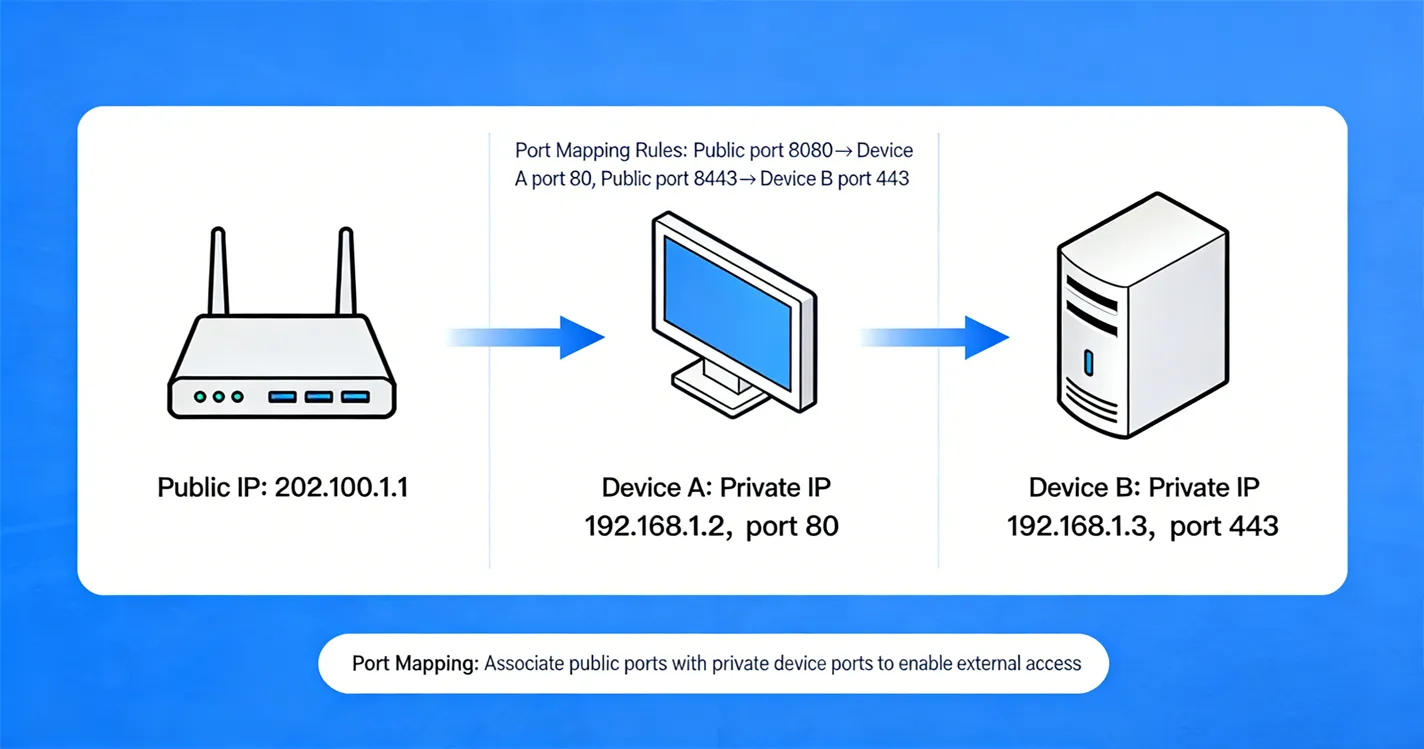
IP address port mapping is a network configuration technique that redirects data packets from a specific port on a public IP address to a designated private IP address and port within a local area network (LAN). It operates through network devices such as routers or firewalls, which act as intermediaries to route external access requests to the correct internal resources.
To simplify the concept: A public IP address functions as the "public entrance" to a network, while ports are the "designated rooms" within that entrance. Without port mapping, external devices can reach the router or firewall but cannot identify which internal server or device should handle their request. By configuring port mapping rules, network administrators explicitly define which internal device and port should receive data sent to a specific public IP and port combination.
This technology is indispensable in three key scenarios:
-
Internal devices (e.g., servers, surveillance cameras, ROIP gateways) need to provide services to external users or systems.
-
Multiple internal servers require external access but only one public IP address is available from the internet service provider (ISP).
-
Cross-network data transmission is necessary for applications like remote monitoring, web hosting, or inter-office communication.
How Does IP Address Port Mapping Work?
To fully grasp IP address port mapping, it’s essential to break down its core components and step-by-step data flow. The technology relies on four key elements and a transparent redirection process that ensures seamless communication between external clients and internal devices.
Core Components of IP Address Port Mapping
-
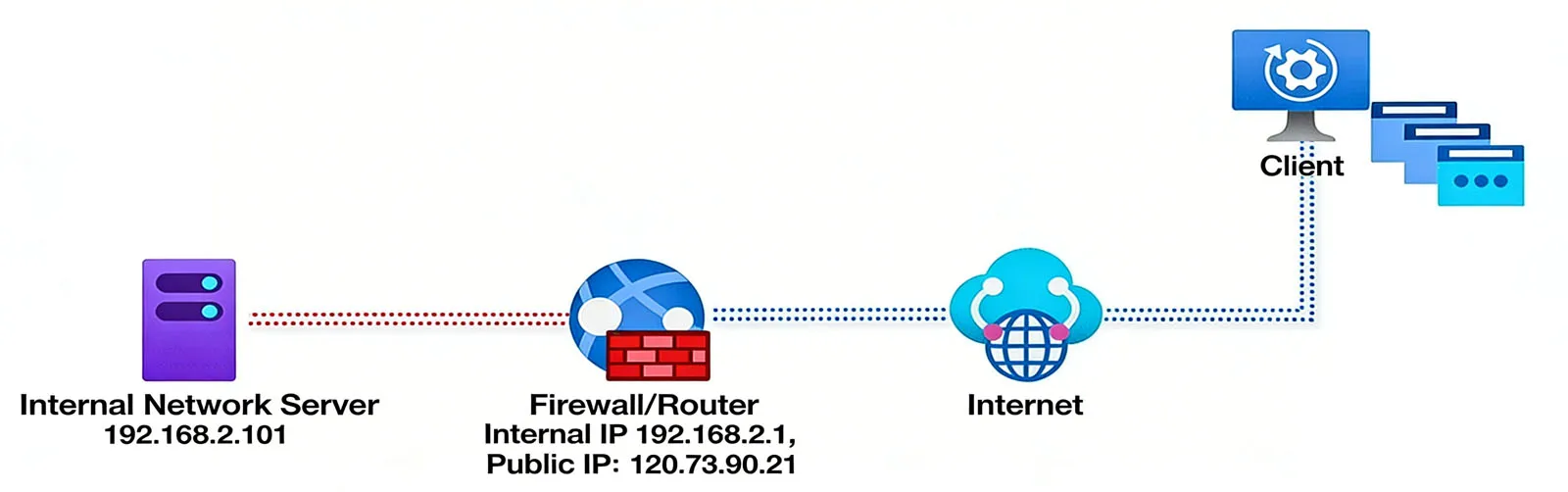
Public IP Address: A unique identifier assigned by an ISP that represents the network on the public internet. External devices use this address to initiate communication with the internal network. For example, a typical public IP might be 120.73.90.21.
-
Private IP Address: Reserved addresses used exclusively for devices within a LAN (e.g., 192.168.2.101, 192.168.2.102). These addresses are not visible or routable on the public internet and can only be accessed within the internal network.
-
Ports: Numerical identifiers (ranging from 0 to 65535) that distinguish different services or applications on a single device. Standard ports include 80 for HTTP (web services) and 443 for HTTPS, while custom applications often use non-standard ports like 8080, 8090, or 8091.
-
Router/Firewall: The network device that stores port mapping rules. It intercepts incoming data packets from the public internet, checks their destination port, and forwards them to the corresponding internal device and port based on preconfigured rules.
Step-by-Step Data Flow
-
An external client (e.g., a remote user, another server, or a ROIP gateway) sends a request to the target network’s public IP address, specifying a specific port (e.g., 120.73.90.21:8080).
-
The router or firewall receives the request and searches its internal port mapping rule set to find a match for the destination port (8080 in this example).
-
Based on the matching rule, the router/firewall rewrites the packet’s destination address to the corresponding private IP address and port (e.g., 192.168.2.101:8080).
-
The packet is forwarded to the internal device (e.g., a web server or ROIP gateway) at the private IP address.
-
The internal device processes the request and sends a response back to the router/firewall.
-
The router/firewall rewrites the response packet’s source address from the private IP to the public IP, then forwards it back to the external client.
This entire process is transparent to both the external client and the internal device, creating the illusion that the internal device is directly connected to the public internet.
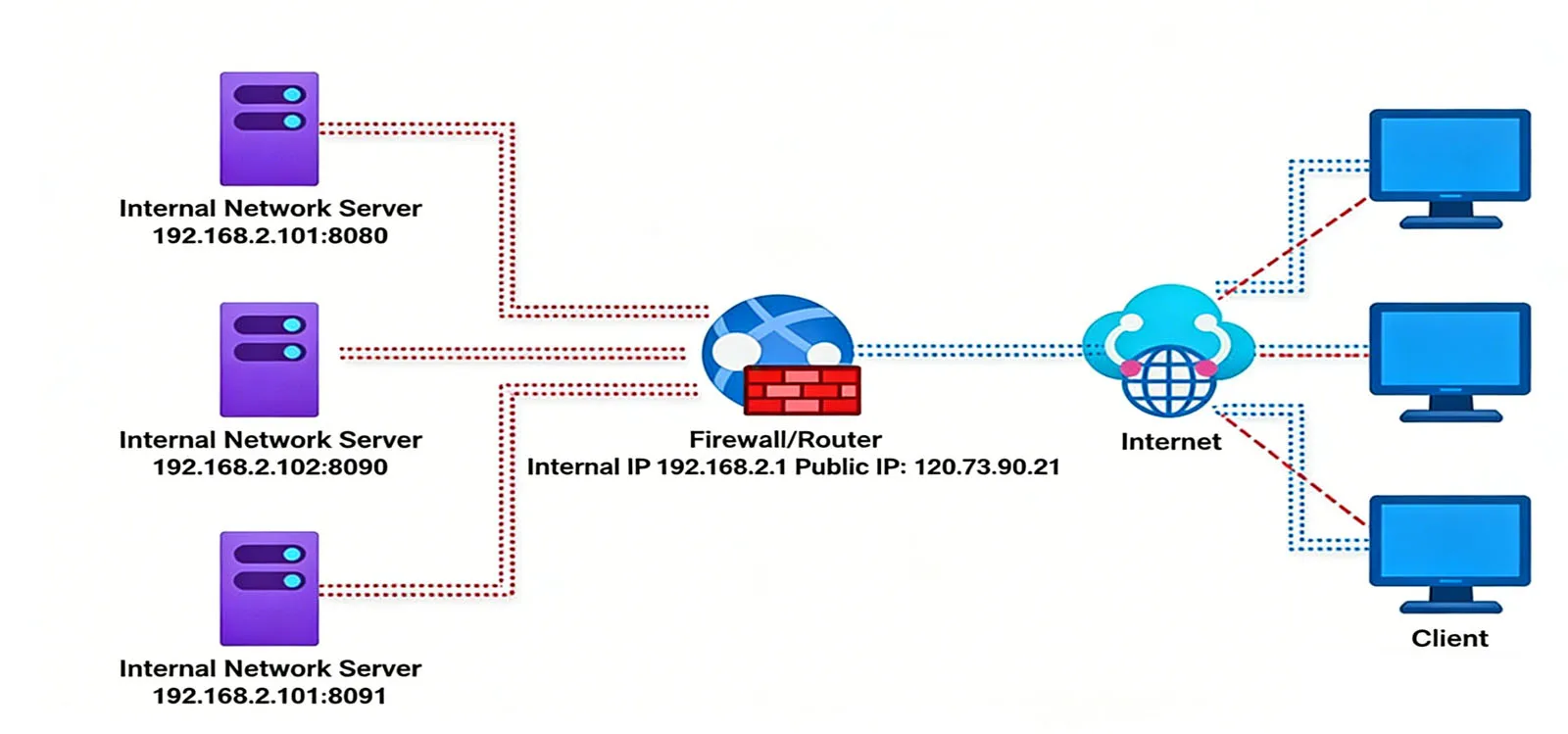
Why Is IP Address Port Mapping Necessary?
IP address port mapping addresses two critical challenges in network communication: enabling external access to internal resources and maximizing the value of limited public IP addresses. Below are the key reasons why it’s a staple in modern system integration projects.
Enabling Cross-Network Access to Internal Devices
Most devices in enterprise, industrial, or residential networks use private IP addresses—a security measure designed to protect internal networks from unauthorized access. However, this security feature also blocks legitimate external communication with internal resources that need to provide services to the public or remote users.
For example, suppose a Becke Telcom ROIP gateway is deployed in a corporate LAN with the private IP address 192.168.2.101. A remote team needs to connect to this gateway to establish intercom communication, but they cannot directly access the private IP address from the public internet. By configuring port mapping on the router—mapping the public IP 120.73.90.21:8080 to the private IP 192.168.2.101:8080—the remote team can send requests to the public IP and port, and the router will forward the data to the internal ROIP gateway. This enables seamless cross-network communication, allowing remote users to access the gateway’s services as if they were on the internal network.
This use case extends to a wide range of scenarios, including:
-
Remote access to video surveillance cameras in retail stores, industrial facilities, or residential complexes.
-
External users accessing web servers, FTP servers, or application servers hosted on an internal network.
-
Cross-network connectivity for ROIP gateways, enabling intercom communication between geographically dispersed teams.
Supporting Multiple Internal Servers with One Public IP
In many projects, organizations may have multiple internal servers that need to provide external services, but they only have one public IP address assigned by their ISP. Acquiring additional public IPs can be costly and unnecessary, making port mapping a cost-effective solution. By using different ports to distinguish between internal servers, a single public IP can support multiple services simultaneously.
Consider a company with three internal web servers that all need to be accessible from the public internet:
-
Server 1: 192.168.2.101 (port 8080)
-
Server 2: 192.168.2.102 (port 8090)
-
Server 3: 192.168.2.103 (port 8091)
By configuring port mapping rules on the router, the company can map each internal server to a unique port on the public IP 120.73.90.21:
-
Public port 8080 → Internal 192.168.2.101:8080
-
Public port 8090 → Internal 192.168.2.102:8090
-
Public port 8091 → Internal 192.168.2.103:8091
External clients can then access each server by specifying the corresponding public port:
-
Server 1: 120.73.90.21:8080
-
Server 2: 120.73.90.21:8090
-
Server 3: 120.73.90.21:8091
This configuration maximizes the utility of a single public IP address, reduces costs associated with additional IPs, and simplifies network management by centralizing access through a single public address.
Practical Applications of IP Address Port Mapping
IP address port mapping is a versatile technology with applications across industries and use cases. Below are some of the most common scenarios where it plays a critical role in system integration and network operation.
Web Server Hosting
Many small and medium-sized enterprises (SMEs) and large organizations host their own web servers, e-commerce platforms, or internal portals on internal networks to maintain data control and reduce cloud hosting costs. Port mapping enables external users to access these web services without requiring a dedicated public IP for each server.
For example:
-
A company hosts a customer portal on a web server with the private IP 192.168.2.102 and port 8090.
-
The network administrator configures port mapping on the router, mapping public port 8090 to 192.168.2.102:8090.
-
Customers access the portal by entering the public IP and port (e.g., 120.73.90.21:8090) in their web browsers.
-
The router forwards HTTP/HTTPS requests to the internal web server, which returns the portal content to the customers.
This application is scalable and cost-effective, allowing organizations to add more web servers and configure additional port mapping rules as their needs grow.
Video Surveillance and Remote Monitoring
Video surveillance systems are a cornerstone of security in commercial buildings, industrial facilities, retail stores, and residential complexes. These systems typically consist of IP cameras connected to a network video recorder (NVR) or video management server, which is often located on an internal network for security.
Port mapping enables remote monitoring of surveillance feeds from anywhere with an internet connection:
-
The NVR or video management server is assigned a private IP address (e.g., 192.168.2.103) and a port (e.g., 8091) for remote access.
-
Port mapping is configured to map the public IP and port to the server’s private IP and port.
-
Authorized users access the surveillance feeds via a mobile app or web browser by entering the public IP and port.
-
The router forwards the access request to the internal server, which streams the video feeds to the user’s device.
This allows security personnel, business owners, or homeowners to monitor their premises in real time, review recorded footage, and receive alerts remotely—enhancing overall security and convenience.
ROIP Gateway Connectivity
ROIP (Radio over IP) gateways are critical for integrating traditional two-way radios with IP networks, enabling intercom communication across large areas or between remote teams. Becke Telcom’s ROIP gateways are often deployed in internal networks to ensure network stability and security, but they require external access for remote teams to connect.
Port mapping facilitates ROIP gateway connectivity:
-
The Becke Telcom ROIP gateway is assigned a private IP address (e.g., 192.168.2.101) and a dedicated port (e.g., 8080) within the LAN.
-
The network administrator configures port mapping on the router, mapping the public IP (e.g., 120.73.90.21) and port 8080 to the gateway’s private IP and port.
-
Remote teams configure their devices to connect to the public IP and port (120.73.90.21:8080).
-
The router forwards the connection request to the internal ROIP gateway, enabling seamless intercom communication between remote and on-site teams.
This setup ensures reliable, low-latency communication for industries like construction, public safety, and logistics—where real-time coordination is critical.
Video Conferencing Systems
Video conferencing platforms (e.g., custom enterprise solutions or third-party tools) require cross-network communication between internal users and external participants. Port mapping ensures that the video conferencing server, hosted on an internal network, can receive and transmit data to external devices.
In this scenario:
-
The video conferencing server is deployed on the internal network with a private IP address and dedicated ports for audio, video, and data transmission.
-
Port mapping rules are configured to map the necessary public ports to the server’s private IP and ports.
-
External participants join the conference by connecting to the public IP and port, which the router forwards to the internal server.
-
The server handles audio/video streaming, screen sharing, and data exchange between all participants, ensuring smooth collaboration.
This application is particularly valuable for enterprises that host their own video conferencing infrastructure to maintain security, compliance, or performance standards.
Best Practices for Implementing IP Address Port Mapping
To ensure the security, reliability, and efficiency of IP address port mapping configurations, follow these best practices tailored to system integration projects:
Use Non-Standard Ports for Enhanced Security
Standard ports (e.g., 80 for HTTP, 443 for HTTPS, 21 for FTP) are prime targets for hackers and malicious bots. To reduce the risk of unauthorized access, use non-standard ports (e.g., 8080, 8090, 8443) for port mapping. This adds an extra layer of security by making it harder for attackers to guess the correct port for accessing internal devices.
Restrict Access with Firewall Rules
Port mapping should always be paired with firewall rules to limit access to trusted IP addresses or ranges. For example, if a port mapping rule is configured for a Becke Telcom ROIP gateway, the firewall can be set to only allow incoming traffic from the IP addresses of remote teams or authorized devices. This prevents unauthorized external parties from attempting to access the internal gateway.
Document Port Mapping Rules
Maintain a clear, up-to-date document of all port mapping rules, including the public port, private IP address, private port, and associated service/application. This documentation is critical for network administrators to troubleshoot issues, update configurations, and ensure compliance with organizational policies.
Test Configurations Thoroughly
After configuring port mapping rules, test connectivity from both external and internal networks to verify that data packets are being forwarded correctly. Use tools like ping, tracert, or online port checkers to confirm that the public port is open and that the internal device is receiving and responding to requests. This helps identify and resolve issues such as incorrect port mappings, firewall blockages, or network connectivity problems.
Regularly Update Router/Firewall Firmware
Router and firewall firmware updates often include security patches, performance improvements, and new features that enhance the reliability of port mapping. Regularly updating firmware ensures that the network device is protected against known vulnerabilities and operates at peak efficiency.
Conclusion
IP address port mapping is a fundamental technology for enabling secure, flexible cross-network communication in modern system integration projects. By bridging public and private networks, it solves the critical challenge of accessing internal resources from the public internet while optimizing the use of limited public IP addresses.
Whether deploying web servers, video surveillance systems, ROIP gateways, or video conferencing platforms, port mapping provides a cost-effective, scalable solution for seamless connectivity. Its transparent working principle—relying on routers or firewalls to redirect data packets—ensures that external clients and internal devices communicate as if they were on the same network, supporting a wide range of industrial, commercial, and enterprise applications.
By following best practices such as using non-standard ports, restricting access with firewall rules, documenting configurations, and testing thoroughly, organizations can maximize the benefits of IP address port mapping while minimizing security risks. As network technologies continue to evolve, port mapping remains a core component of reliable, efficient cross-network communication—enabling businesses to deploy innovative solutions and adapt to changing connectivity needs. For Becke Telcom customers, this technology is a key enabler of integrated networking, ensuring that their internal resources are accessible, secure, and optimized for performance.

 English
 Deutsch
 한국어
한국어 Русский
 Français
 日本語
日本語 لالعربية
 हिन्दी
 Español
 Português
 繁体中文
繁体中文 简体中文
简体中文