Introduction
In today’s fast-paced communication landscape, IP phones have transcended basic voice calls to become cornerstone tools for enterprises. Powered by network-based transmission and built-in computing capabilities, they deliver multimedia services and specialized functions that analog phones simply cannot match. Among these game-changing features, Direct Station Selection (DSS) keys stand out as a customizable solution to streamline complex workflows, reduce operational friction, and boost team productivity.
A trusted provider of communication technology integrates robust DSS key functionality into its IP phone lineup to cater to the diverse needs of businesses, public institutions, and industrial sectors. These programmable keys can be tailored to execute a wide range of tasks—from speed dialing and call management to web browsing and remote access—with a single tap. Unlike rigid analog phones, IP phones with DSS keys adapt to unique operational requirements, transforming standard communication devices into personalized hubs for efficiency. This article delves into the technical capabilities, configuration nuances, and real-world applications of DSS keys, highlighting how they unlock the full potential of enterprise-grade IP phones.
What Are DSS Keys on Enterprise IP Phones?
Direct Station Selection (DSS) keys are programmable function buttons designed to simplify repetitive or complex communication tasks. Unlike fixed function keys (e.g., “hold” or “mute”), DSS keys are fully customizable, allowing users to map frequently used numbers, features, URLs, or system commands to dedicated buttons. This eliminates the need for manual dialing, multi-step menu navigation, or memorization of complex codes—saving critical time in high-pressure environments.
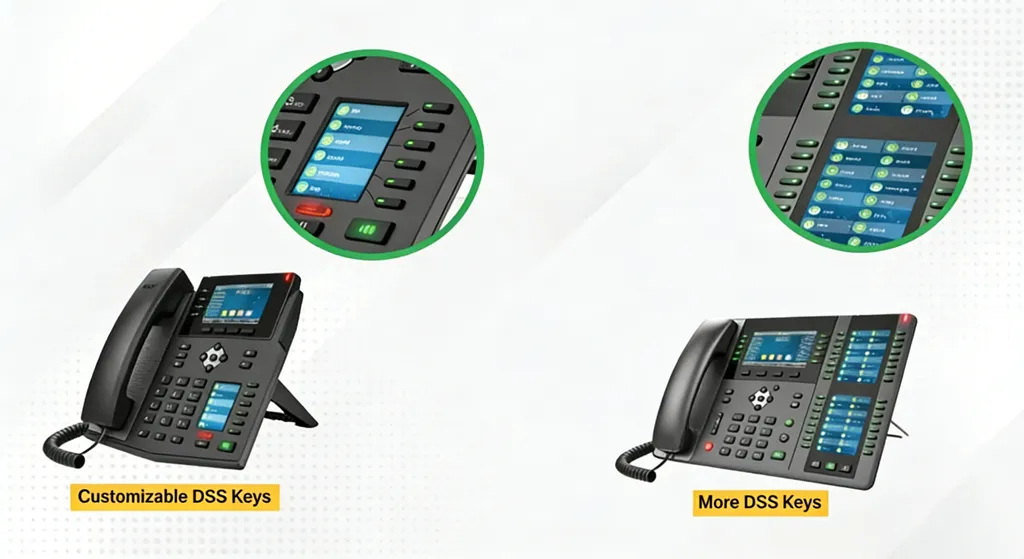
The number of DSS keys available varies by IP phone model, ensuring scalability across use cases: entry-level models typically offer 2–4 DSS keys for small teams or individual users, while high-end dispatch-focused devices can support hundreds of programmable keys. This flexibility lets organizations select hardware that aligns with their specific needs, whether equipping a small office receptionist or an industrial control room.
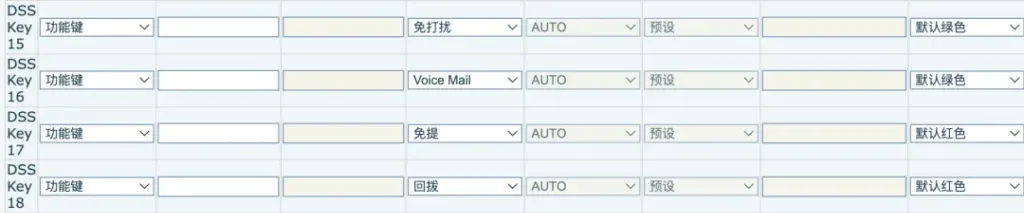
A key technical advantage of enterprise-grade DSS implementation is its intuitive configuration interface. Users can define key labels (for easy identification), assign target numbers or functions, and even customize LED indicator colors (e.g., red for active functions, green for standby) to match operational workflows. This visual feedback system enhances usability, reducing human error and ensuring quick adoption by teams—even those with limited technical expertise.
Core Functionalities of IP Phone DSS Keys
IP phone DSS keys unlock a suite of technical capabilities that address common pain points in professional communication. Below is a detailed breakdown of the most impactful applications, complete with configuration guidelines and real-world use cases.
Speed Dial: Instant Access to Critical Contacts
Speed dial is the most widely used DSS key function, enabling users to assign frequently contacted numbers—internal extensions, client lines, emergency services, or roip gateway endpoints—to dedicated buttons. For example, a warehouse manager might program DSS keys for “Main Gate – 6002@SIP7” or “Field Team Roip Gateway – 6003@SIP7,” while a receptionist could map keys for department heads or external partners.
Configuration is straightforward via the IP phone’s web-based management portal or on-device settings: users enter the target number in SIP URI format (e.g., 6001@SIP7) and assign a descriptive label. Many enterprise IP phone models also allow selecting LED colors for speed dial keys, making it easy to visually distinguish between internal extensions, external contacts, and critical services. The result is one-tap calling that eliminates dialing errors and reduces call initiation time by up to 80% compared to manual entry.
Customizable Call Management Functions
Beyond speed dial, DSS keys can be programmed to trigger core IP phone features, replacing multi-step processes with single-tap actions. Enterprise IP phones support a range of call management functions via DSS keys, each optimized for specific operational needs:
- Do Not Disturb (DND): Blocks incoming calls to minimize interruptions during focused work, with a default green LED indicator to signal activation.
- Voice Mail: Provides direct access to voicemail inboxes, eliminating the need to dial access codes or navigate menus, with a green LED for standby status.
- Speakerphone: Activates hands-free calling for multitasking, with a red LED to confirm the function is active.
- Call Back: Redials the last missed call instantly, saving time on manual retrieval, with a red LED indicator.
- Call Hold: Pauses active calls temporarily to handle other tasks, with an amber LED to signal the held call status.
- Call Pickup: Answers calls ringing on another extension (via the *85 code) to ensure no critical communications are missed, with a green LED for ready status.
These customizable functions adapt to diverse workflows: customer service teams can prioritize call hold and pickup to manage high call volumes, while remote workers might map speakerphone and voicemail for flexible communication. By putting critical call management tools at users’ fingertips, DSS keys reduce cognitive load and improve response times.
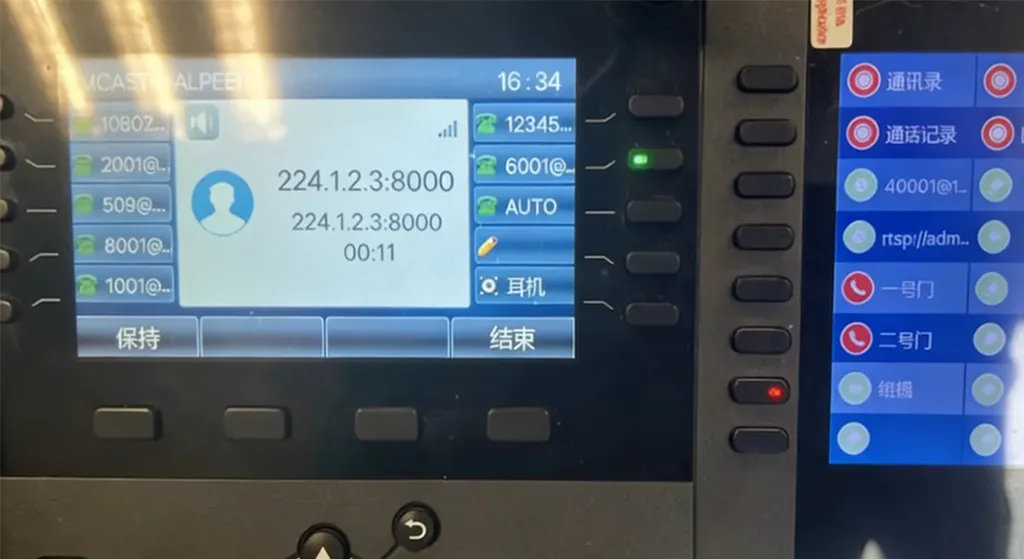
BLF Status Monitoring for Enhanced Coordination
DSS keys integrate seamlessly with Busy Lamp Field (BLF) technology, providing real-time visibility into the status of internal extensions, shared lines, or roip gateways. BLF-enabled DSS keys use LED indicators to communicate three core states: green for idle (available to take calls), flashing red for ringing, and solid red for busy (on an active call).
This feature is particularly valuable for receptionists, dispatch teams, and supervisors. For example, a front desk agent can quickly verify if a department head’s line is free before transferring a call, reducing caller wait times and improving customer satisfaction. In industrial settings, BLF-equipped DSS keys can monitor roip gateway statuses, letting dispatchers know when field teams are available for communication.
Advanced implementations allow integration with IP PBX systems to unlock additional capabilities, such as call monitoring, call intrusion (joining active calls), and call disconnect. By combining DSS keys with BLF, IP phones can function as lightweight dispatch consoles—ideal for environments requiring centralized call management without the cost of dedicated dispatch hardware.
Multicast Paging: One-Tap Broadcast Communication
Many enterprise IP phones support multicast paging via DSS keys, enabling instant one-way audio broadcasts across a network. Unlike traditional paging systems that rely on dedicated hardware or PBX integration, this functionality leverages IP network multicast technology to deliver audio to multiple devices simultaneously—including other IP phones, speakers, and roip gateways.
To configure multicast paging, users assign a DSS key to “MCAST Paging” in the phone’s settings, then input the multicast group address (e.g., 224.1.2.3:8000) and audio codec (typically G.711U for high-fidelity voice transmission). Once configured, a single tap initiates a broadcast, making it ideal for emergency alerts, shift announcements, or facility-wide notifications.
This feature is particularly valuable in industrial facilities, campuses, and warehouses. For example, a plant manager can broadcast safety instructions to all on-site IP phones and roip gateways during an emergency, ensuring critical information reaches every team member instantly. Since multicast paging does not rely on a central PBX, it remains operational even if core systems are temporarily unavailable—adding a layer of reliability to communication workflows.
Web Browsing and Video Streaming Integration
Enterprise IP phones function as compact computing devices, supporting web browsing and video streaming via DSS keys. By programming URLs or Real-Time Streaming Protocol (RTSP) links into DSS keys, users can access web-based resources, surveillance feeds, or video content with a single tap—eliminating the need to manually enter long, error-prone addresses.
Practical applications include:
- Security Operations: Accessing CCTV feeds via RTSP URLs (e.g., rtsp://192.168.2.17) to monitor facilities in real time.
- Industrial Monitoring: Viewing drone footage or equipment dashboards by programming streaming links (e.g., 8.93.97/video/3101) into DSS keys.
- Conference Rooms: Launching video conferencing platforms (e.g., Zoom or Microsoft Teams) via web URLs for instant meetings without additional devices.
Integration with video gateways extends this capability further: drone footage or analog camera feeds can be converted to RTSP format via a gateway, then accessed directly on the IP phone through a DSS key. This seamless integration bridges physical and digital communication channels, making IP phones a central hub for multimedia access in industrial and commercial settings.
SIP URL Calling: Authentication-Free Communication
Most IP phones require registration to an IP PBX or softswitch for full functionality, but DSS keys support SIP URL calling—enabling communication without prior authentication (as permitted by the SIP protocol). This is particularly useful for scenarios where quick access to unregistered services or temporary endpoints is needed.
To use this feature, users program a DSS key with a SIP URI (e.g., 6666@192.168.1.100 for a server-based extension or meeting@conference-server.com for a video call). Tapping the key initiates the call instantly, no login or configuration required. Common use cases include joining unauthenticated video conferences, calling temporary guest lines, or accessing roip gateway channels for field team communication.
SIP URL calling preserves the IP phone’s core voice functionality while adding flexibility for ad-hoc communication. This makes enterprise IP phones ideal for dynamic environments like event venues, construction sites, or temporary project teams—where traditional registered communication setups are impractical.
Why Choose IP Phones with DSS Keys?
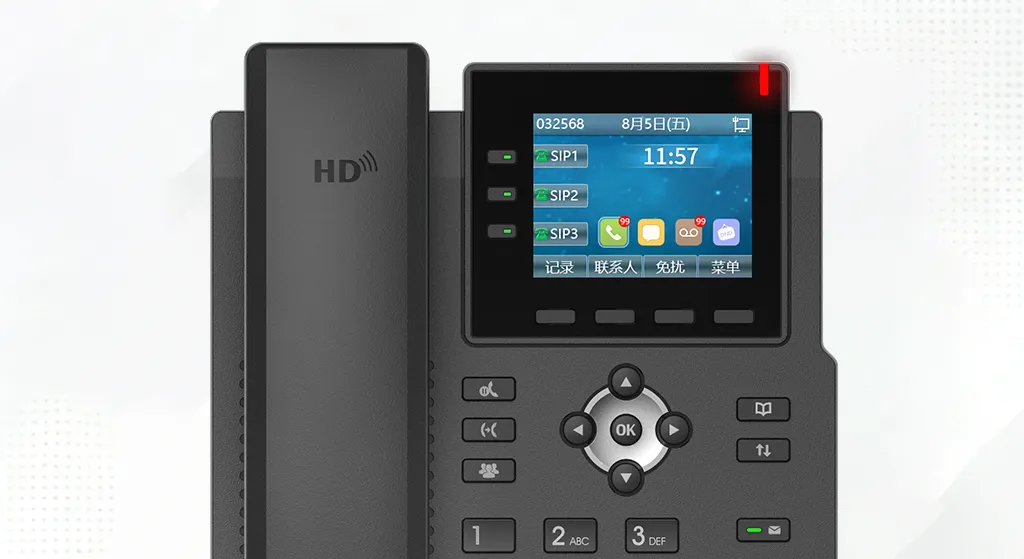
Enterprise-grade DSS key implementation offers three distinct technical and operational advantages that set it apart from standard IP phones:
1. Tailored to Operational Workflows
Unlike one-size-fits-all communication devices, DSS keys adapt to unique team needs. Whether programming speed dial for a receptionist, multicast paging for a plant manager, or video streaming for a security team, the customizable nature of DSS keys ensures the phone works for the user—not the other way around. This tailored approach reduces friction, minimizes training time, and maximizes adoption across teams.
2. Seamless Integration with Existing Systems
IP phones with DSS keys integrate seamlessly with existing communication infrastructure, including IP PBX systems, roip gateways, video surveillance networks, and cloud-based collaboration tools. This interoperability eliminates the need for costly system overhauls, allowing organizations to leverage their current investments while adding DSS-driven efficiency. For example, DSS keys can be configured to interact with existing roip gateways, enabling one-tap communication with field teams without replacing legacy radio systems.
3. Scalability Across Use Cases
From small offices to large industrial facilities, DSS-enabled IP phones scale to meet evolving needs. With models ranging from 2–4 DSS keys to hundreds of programmable buttons, organizations can start small and expand as requirements grow. This scalability makes enterprise IP phones a long-term investment, capable of adapting to new workflows, expanding teams, or emerging communication needs.
Conclusion
IP phones with DSS keys redefine what a communication device can do—transforming standard IP phones into personalized, efficient hubs for modern teams. By enabling one-tap access to speed dial, call management, BLF monitoring, multicast paging, web browsing, and SIP URL calling, DSS keys eliminate operational friction and boost productivity across industries.
Whether used in a reception area, industrial control room, or remote project site, DSS keys adapt to unique workflows, integrate with existing systems, and scale with organizational growth. For businesses seeking to unlock the full potential of their communication infrastructure, IP phones with DSS keys offer a technical, user-centric solution that drives efficiency and enhances collaboration.
As communication technology continues to evolve, DSS keys remain a critical feature for organizations prioritizing agility, productivity, and seamless connectivity. With a focus on innovation and interoperability, DSS-enabled IP phones will continue to be a cornerstone of modern communication ecosystems.

 English
 Deutsch
 한국어
한국어 Русский
 Français
 日本語
日本語 لالعربية
 हिन्दी
 Español
 Português
 繁体中文
繁体中文 简体中文
简体中文