Leading industrial special communication provider with rich global cases. Our explosion-proof & SIP dispatch systems power projects—your reliable partner with proven success.
Leading industrial special communication provider with rich global cases. Our explosion-proof & SIP dispatch systems power projects—your reliable partner with proven success.
Broadcast Video Intercom System: How It Works and Where It Is Used
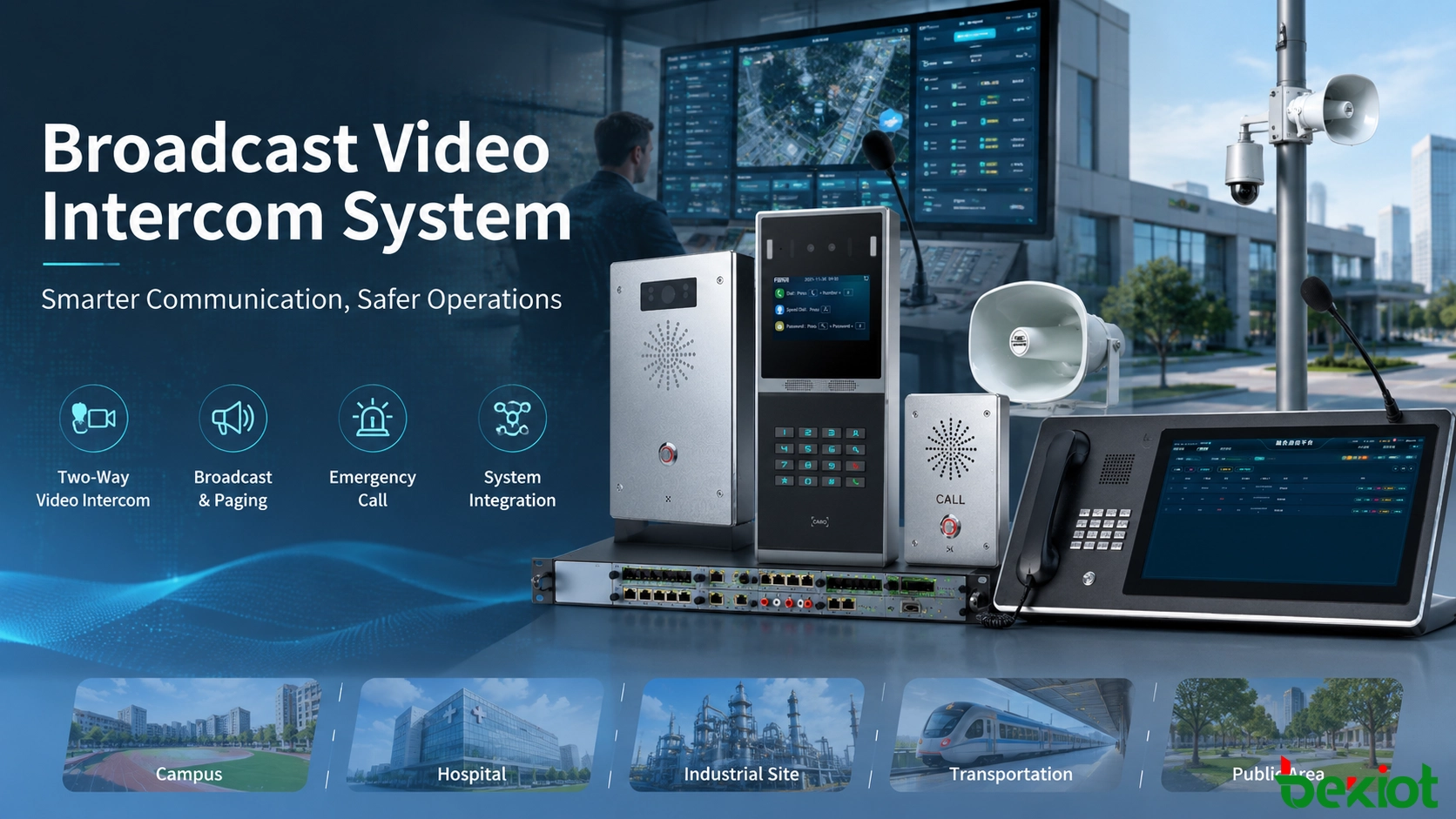
A broadcast video intercom system combines IP broadcasting, two-way video intercom, emergency calling, monitoring and system integration. This guide explains how the architecture works, where it is used and how to plan deployment.
Becke Telcom
A broadcast video intercom system combines public-address broadcasting with two-way voice and video communication over an IP network. Instead of operating broadcasting, intercom, surveillance, access control and emergency calling as completely separate systems, the platform can connect these functions so that operators can communicate with specific terminals, broadcast to selected zones, confirm events visually and coordinate a response from a central management point.
This architecture is increasingly used in schools, hospitals, industrial facilities, campuses, transportation sites, tourist attractions and smart-city projects. Its value is not limited to adding video to a conventional PA system. The larger benefit is that one network can support routine announcements, point-to-point communication, emergency calls, visual verification, alarm handling and integration with other site systems.
How the System Works
Traditional public-address systems are mainly designed for one-way information delivery. An operator selects an area, sends an announcement and listeners receive it through loudspeakers. That model remains useful for routine paging, background music and emergency announcements, but it provides limited interaction with people at the receiving end.
A broadcast video intercom architecture adds bidirectional communication to the same operational environment. A field terminal can initiate a call to a control room, while the operator can answer, view video when a camera is available, speak with the caller and then broadcast instructions to other relevant areas.
IP networking is the foundation of this architecture. Audio, video, control signaling and management data can be transported across an Ethernet network rather than depending on a dedicated analog audio path for every function. SIP can be used for session-based communication between compatible terminals and servers, while TCP/IP networking allows the system to operate across different network segments and routed networks when the infrastructure is properly designed.
This makes the system suitable for distributed environments. A control center may manage endpoints located in different buildings, zones or sites, while local operators can retain responsibility for their own areas. The same network can also support centralized configuration, terminal status monitoring and communication records.
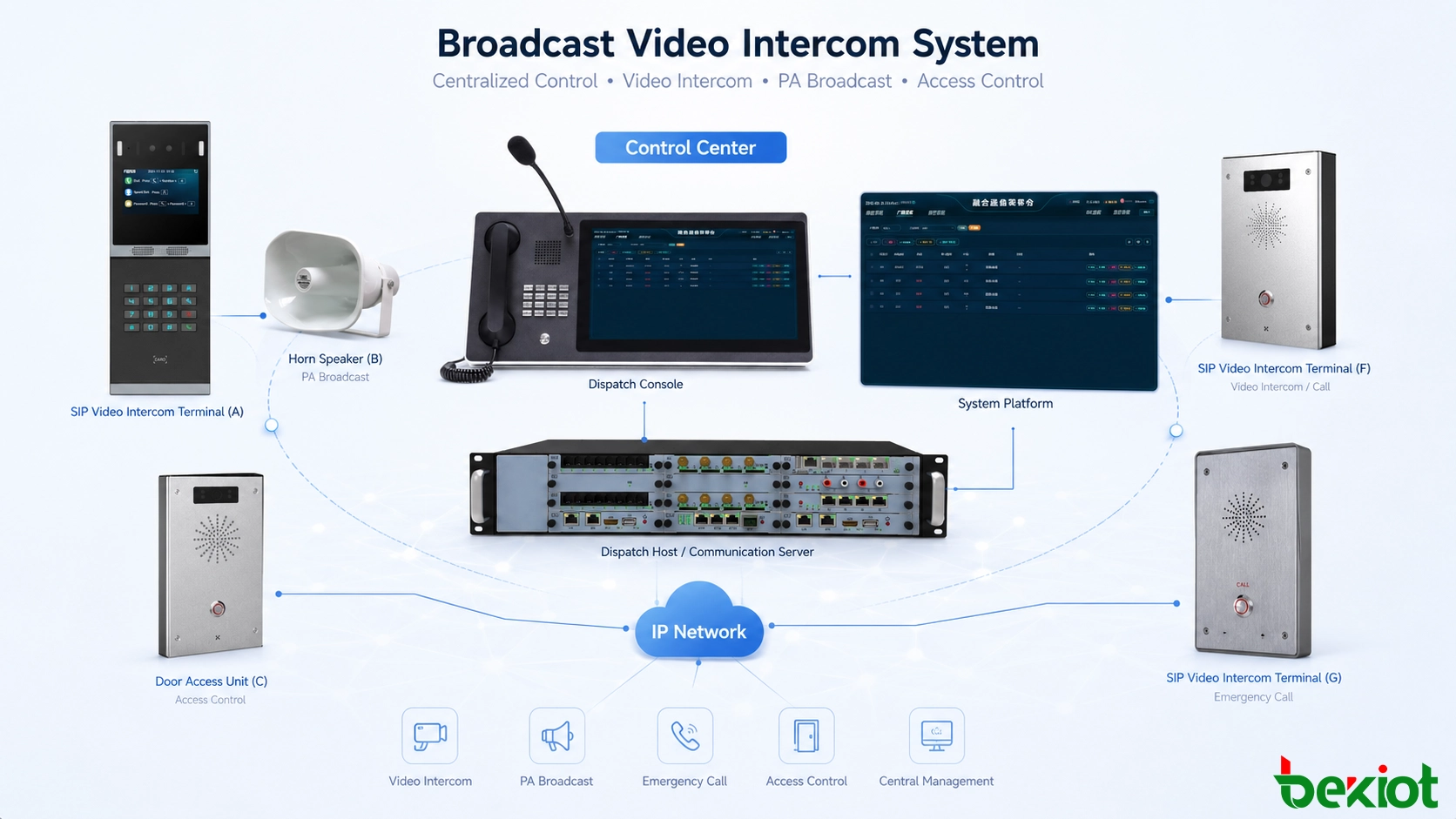
An IP-based broadcast video intercom system connects field communication, broadcasting, video verification and site management through a common network architecture.
Core Capabilities Beyond Paging
The most important difference from a conventional broadcast-only system is the number of communication workflows that can be handled from the same platform.
Two-Way Voice and Video
Operators and field users can communicate directly instead of relying only on one-way announcements. Video can help the control center confirm who is calling, observe the surrounding situation and make a faster decision before sending assistance.
Zoned and Targeted Broadcasting
Announcements do not always need to be sent to the entire site. Terminals can be grouped according to buildings, floors, production areas, departments or other operational zones. Operators can then broadcast to one terminal, one group, several groups or the entire system according to the event.
This is useful for routine notices, scheduled announcements, safety reminders, background audio and emergency evacuation instructions.
Emergency Calling and Alarm Handling
Emergency call points can provide a direct communication path to a control room. Depending on the site design, alarm events may also be linked with cameras, visual indicators, access control or other systems.
The key advantage is that an alarm does not remain only a signal. Operators can establish communication, verify the situation and decide what action should follow.
Recording and Event Review
Voice and video sessions can be recorded when required by the project. Communication records, alarm information and related event data can then be used for incident review, operational supervision and later investigation.
Recording policies should be designed according to storage capacity, security requirements and local privacy rules rather than simply retaining all media indefinitely.
Information Publishing
Where supported by the terminal environment, the management platform can distribute audio, video, images or text to individual devices or selected zones. This extends the system from voice broadcasting into a broader site information channel.
Maps and Terminal Status
Electronic maps or site diagrams can provide operators with a more intuitive way to identify terminal locations and operating status. This is particularly useful in campuses, large industrial sites, transportation facilities and distributed public areas where remembering terminal numbers alone is inefficient.
Integration With Other Systems
Broadcast and intercom functions become more useful when they interact with surrounding infrastructure. Typical integrations can include video surveillance, access control, LED displays, building systems, video conferencing and other third-party platforms.
For example, an emergency call can bring up the related camera, a verified visitor call can be linked with door access, or an alarm can trigger a predefined broadcast to a selected area.
Where It Delivers the Most Value
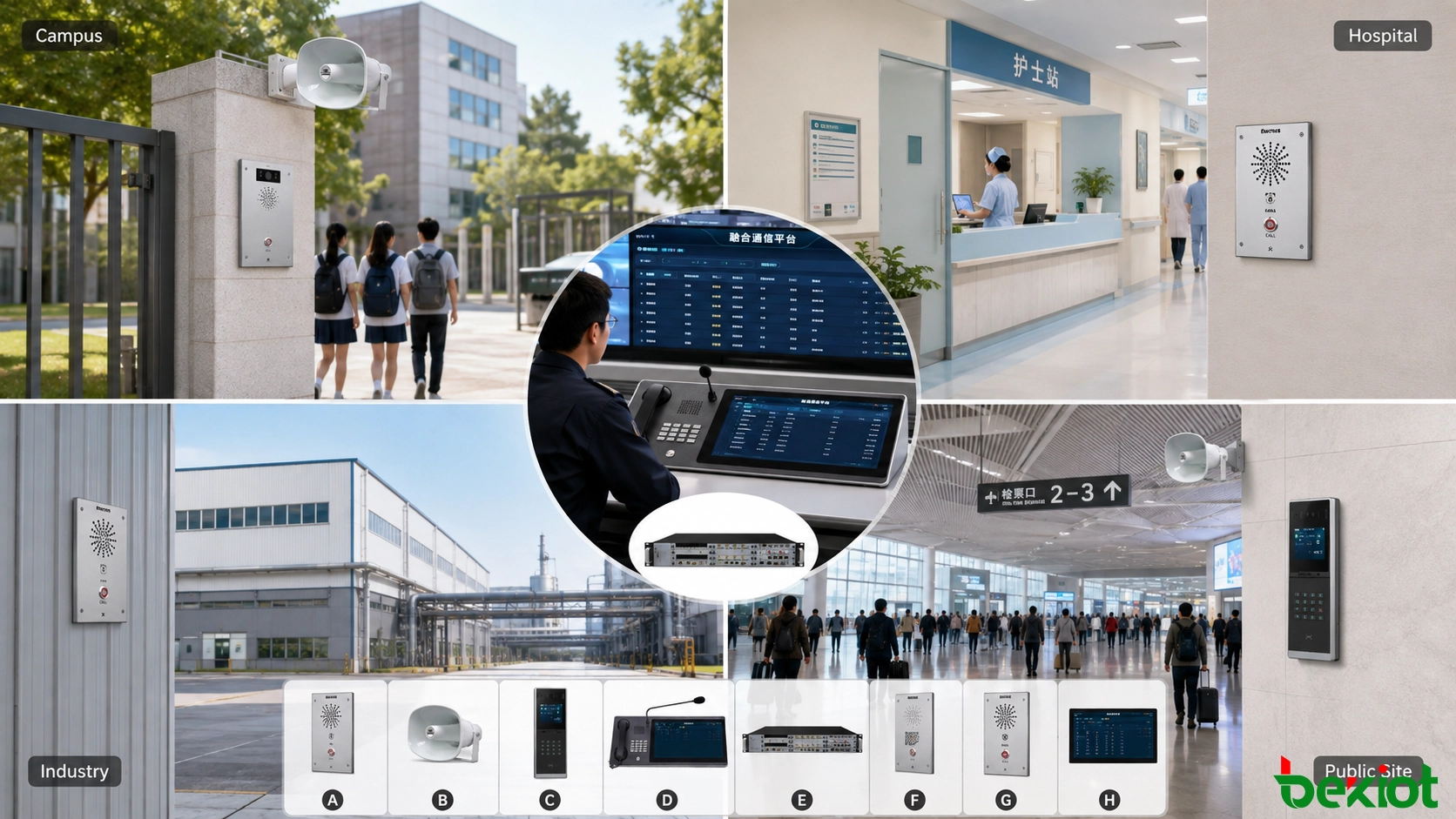
The system is particularly useful where people need both centralized information and a way to communicate back to the management center.
In schools, broadcasting can support class changes, scheduled notices and emergency announcements, while intercom terminals provide a direct communication channel between classrooms, entrances, security points and management offices.
Hospitals require a different workflow. Patients, visitors and staff may need direct communication with nurses, security personnel or administration. Broadcasting can handle routine notices and emergency messages, while visual intercom can assist with entrances, restricted wards and remote communication.
In shopping centers and large commercial buildings, public announcements can be combined with visitor assistance, security calls and communication between service points and the control room.
Industrial facilities can use the system for operational paging, emergency instructions and communication between field personnel and a control center. Where an event is reported, operators can communicate directly with the caller before deciding whether to notify maintenance, security or emergency teams.
Tourist attractions and parks can deploy emergency call points along visitor routes. A visitor who encounters a medical emergency, becomes lost or identifies a safety issue can contact the management center directly. The same infrastructure can be used for public information and emergency broadcasting.
Transportation environments, including rail facilities and other large public sites, can also use the architecture to connect emergency communication points, public-address functions and centralized monitoring.
The same basic architecture can support different workflows depending on whether the site prioritizes routine paging, emergency assistance, security communication or operational coordination.
Why IP Changes the Design
Moving broadcasting and intercom onto an IP network changes both system expansion and management.
In a conventional analog broadcasting architecture, adding a new area may require additional dedicated cabling and changes to the audio distribution structure. An IP system can use the existing network infrastructure where capacity, availability and security requirements allow it. New endpoints can be added at network-accessible locations without rebuilding the entire audio distribution path.
Digital transmission also reduces dependence on long analog audio runs. Audio is transported as network data, which can improve consistency over larger systems when the LAN and WAN are designed correctly.
More importantly, IP enables different services to coexist on the same communications foundation. Broadcasting, point-to-point intercom, video, control signaling and management information can all be associated with networked endpoints.
This does not mean that any office network can automatically support a critical communication system. Voice and video remain sensitive to packet loss, latency, jitter and congestion. Network capacity, VLAN design, routing, QoS, redundancy and power backup should therefore be evaluated according to the importance of the application.
Distributed management is another benefit. Large organizations can manage multiple buildings or locations centrally while assigning permissions to regional operators. Terminal groups can be organized according to physical areas or operational responsibilities so that users see only the resources they are authorized to control.
Planning a Practical Deployment
A useful design starts with operational workflows rather than a list of devices. The first question is what needs to happen when someone initiates a call, an alarm occurs or an announcement must be distributed.
The site should then be divided into communication zones. Buildings, floors, wards, platforms, production areas or visitor zones may require different broadcast permissions and call destinations. Grouping should reflect real responsibilities rather than simply copying the physical network topology.
Call routing also needs to be defined. A field terminal may call a local duty room first and transfer to a central control room if unanswered. Other emergency points may need to connect directly to security or an emergency center. Busy transfer, timeout transfer and other routing rules can help ensure that calls do not remain unanswered.
Video should be introduced where visual verification provides operational value. Entrance points, emergency call stations and important public areas are common examples. It is not necessary to attach video to every communication point if voice communication is sufficient for the workflow.
Broadcast priorities should also be established. Routine announcements, scheduled programs and background audio must not prevent emergency instructions from being delivered. Critical broadcasts should be able to override lower-priority content according to the site emergency plan.
Integration should be planned at the same stage. If the project needs surveillance linkage, electronic maps, access control, information displays or other third-party systems, the required interfaces and event logic should be defined before deployment rather than added after the communication system is already operational.
Finally, the network itself requires acceptance testing. Projects should verify call quality, broadcast delay, video performance, endpoint recovery, network interruption behavior and system operation during busy periods.
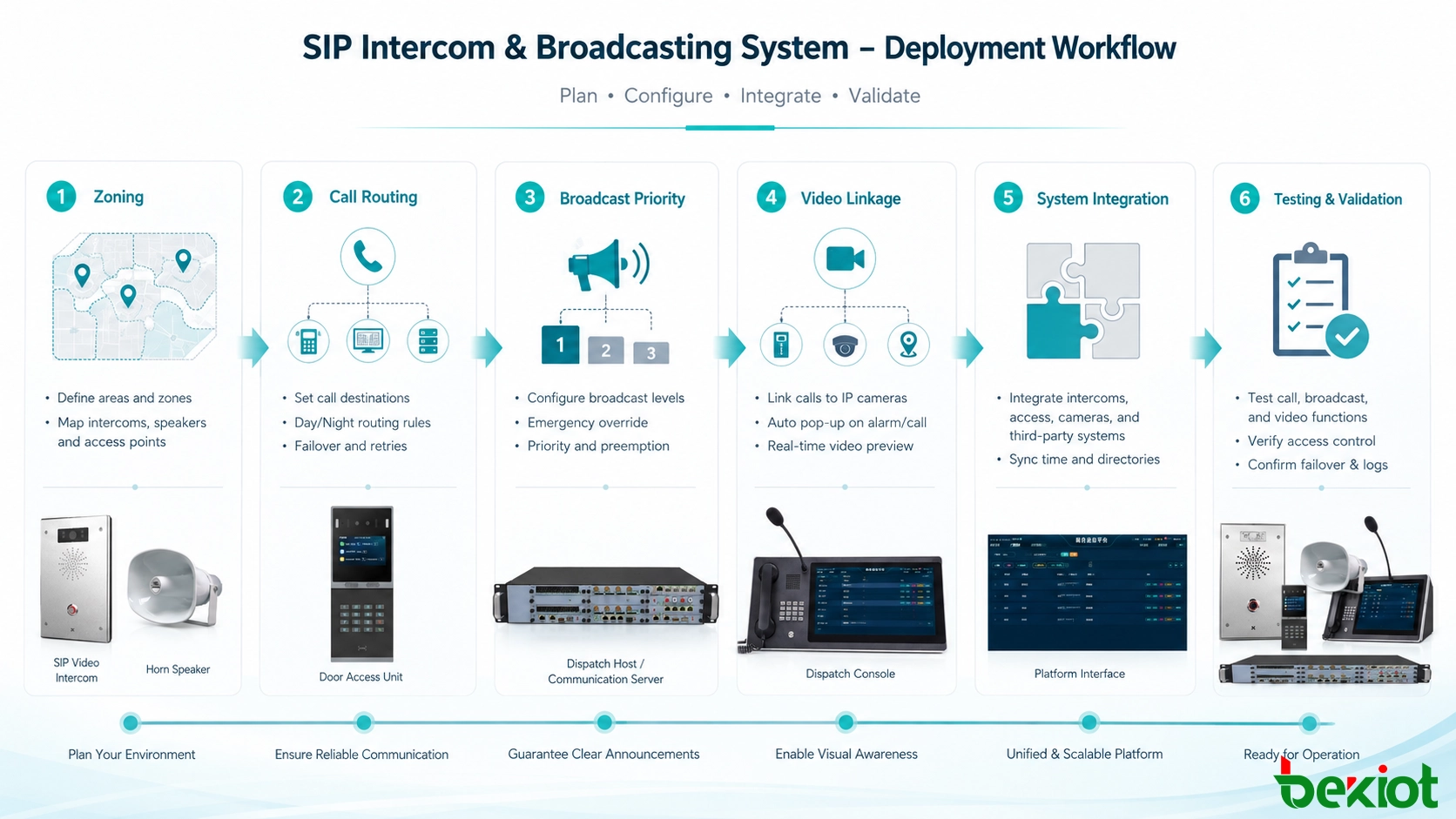
Deployment should begin with communication workflows and zoning before terminals, integrations and network resources are finalized.
Smart-City and Campus Integration
Smart-city and smart-campus projects illustrate why broadcasting and visual intercom are increasingly deployed as connected services rather than isolated subsystems.
Smart poles can combine lighting, cameras and public communication infrastructure. A networked intercom and broadcast function can provide emergency assistance, public announcements and direct communication with a city management center through the same broader digital infrastructure.
In a command center, incoming calls and alarms can be handled together with visual information. Operators can identify the event location, communicate with the field and distribute instructions without depending on separate systems for every action.
Smart industrial parks and large campuses can apply the same concept to extreme-weather warnings, incident notification and site-wide emergency coordination. Routine broadcasting may be managed locally, while major events can be controlled centrally.
Other potential environments include public-security assistance points, correctional facilities, banking self-service areas, mining and industrial sites, rail transportation, forest parks and other locations where users may need immediate contact with a management center.
The important design principle is not the specific site type. The system provides the most value when a location needs to connect emergency calling, two-way communication, public notification and situational information in one operational process.
A Hospital Workflow Example
Hospitals demonstrate how the architecture can support both daily communication and emergency management.
In patient areas, intercom can provide a communication path to staff without requiring every request to become a physical visit. Where video is appropriate, staff may visually confirm conditions before responding. The system can also support communication at ward entrances, restricted areas and visitor access points.
Hospital broadcasting serves several different purposes. Routine paging can distribute operational announcements, while emergency broadcasts can take priority during fire alarms or other incidents that require rapid notification.
Video intercom can also support controlled access. Visitors at restricted ward entrances can communicate with staff before entry is authorized. When the communication platform is integrated with access control, approved entry can be handled within the same operational workflow.
Integration with hospital information systems can provide additional value where project requirements allow it. Communication events, alarms or patient-related information may be associated with existing workflows rather than maintained as completely separate records.
Privacy is particularly important in healthcare environments. Audio, video, patient information and communication logs can contain sensitive information, so access permissions, data storage, encryption and retention policies should be defined according to applicable security and privacy requirements.
Conclusion
A broadcast video intercom system is more than a digital replacement for a traditional PA system. Its main advantage is the ability to connect one-way broadcasting with two-way voice and video communication, emergency calling, event verification and integration with other site systems.
IP networking makes distributed deployment and centralized management easier, but successful implementation still depends on careful zoning, call routing, broadcast priority, network performance and integration planning. A system that simply places more devices on a network is not automatically an effective communication solution.
The strongest projects begin with the real operational process: who needs to communicate, who should receive the call, which areas must hear an announcement, what information the operator needs during an emergency, and which existing systems should respond. Once these workflows are clear, broadcast, intercom, video and other functions can be combined into a practical and scalable communication architecture.
FAQ
Can the system continue operating if the Internet connection is unavailable?
It depends on the architecture. Systems designed for local operation can keep many communication functions inside the LAN even when an external Internet connection is interrupted. If cloud-hosted functions are required, the project should define what must remain available locally during a WAN outage.
Does every intercom terminal need a camera?
No. Video is most useful where visual verification affects the response, such as entrances, emergency points and security-sensitive locations. Voice-only terminals may be more appropriate for many routine operational positions.
Can existing analog loudspeakers be retained?
In some projects they can. Existing speaker circuits may be connected through suitable interfaces or amplification equipment while newer IP endpoints are added elsewhere. Whether this approach is appropriate depends on the condition of the existing system and the required control functions.
How should permissions be handled in a multi-site deployment?
Permissions should follow operational responsibility. A local operator may control only one building or zone, while a regional or central center can have broader authority. This reduces accidental broadcasts and keeps daily operation manageable as the system grows.
What should be tested before final acceptance?
Acceptance should include real communication workflows rather than only checking whether each terminal is online. Test unanswered calls, emergency priorities, network interruptions, broadcast groups, user permissions, linked systems and recovery after faults so that the complete operational process is verified.
Becke Telcom specializes in industrial explosion-proof comms for rail, tunnel, oil & gas, and marine sectors, offering PAGA, SOS, and IP telephones with integrated PA, intercom, and calling.
If you have any suggestions or questions for us, please feel free to contact us!
We use cookie to improve your online experience. By continuing to browse this website, you agree to our use of cookie.
Cookies
Please read our Terms and Conditions and this Policy before accessing or using our Services. If you cannot agree with this Policy or the Terms and Conditions, please do not access or use our Services. If you are located in a jurisdiction outside the European Economic Area, by using our Services, you accept the Terms and Conditions and accept our privacy practices described in this Policy. We may modify this Policy at any time, without prior notice, and changes may apply to any Personal Information we already hold about you, as well as any new Personal Information collected after the Policy is modified. If we make changes, we will notify you by revising the date at the top of this Policy. We will provide you with advanced notice if we make any material changes to how we collect, use or disclose your Personal Information that impact your rights under this Policy. If you are located in a jurisdiction other than the European Economic Area, the United Kingdom or Switzerland (collectively “European Countries”), your continued access or use of our Services after receiving the notice of changes, constitutes your acknowledgement that you accept the updated Policy. In addition, we may provide you with real time disclosures or additional information about the Personal Information handling practices of specific parts of our Services. Such notices may supplement this Policy or provide you with additional choices about how we process your Personal Information.
Cookies
Cookies are small text files stored on your device when you access most Websites on the internet or open certain emails. Among other things, Cookies allow a Website to recognize your device and remember if you've been to the Website before. Examples of information collected by Cookies include your browser type and the address of the Website from which you arrived at our Website as well as IP address and clickstream behavior (that is the pages you view and the links you click).We use the term cookie to refer to Cookies and technologies that perform a similar function to Cookies (e.g., tags, pixels, web beacons, etc.). Cookies can be read by the originating Website on each subsequent visit and by any other Website that recognizes the cookie. The Website uses Cookies in order to make the Website easier to use, to support a better user experience, including the provision of information and functionality to you, as well as to provide us with information about how the Website is used so that we can make sure it is as up to date, relevant, and error free as we can. Cookies on the Website We use Cookies to personalize your experience when you visit the Site, uniquely identify your computer for security purposes, and enable us and our third-party service providers to serve ads on our behalf across the internet.
We classify Cookies in the following categories: ● Strictly Necessary Cookies ● Performance Cookies ● Functional Cookies ● Targeting Cookies
Cookie List A cookie is a small piece of data (text file) that a website – when visited by a user – asks your browser to store on your device in order to remember information about you, such as your language preference or login information. Those cookies are set by us and called first-party cookies. We also use third-party cookies – which are cookies from a domain different than the domain of the website you are visiting – for our advertising and marketing efforts. More specifically, we use cookies and other tracking technologies for the following purposes:
Strictly Necessary Cookies These cookies are necessary for the website to function and cannot be switched off in our systems. They are usually only set in response to actions made by you which amount to a request for services, such as setting your privacy preferences, logging in or filling in forms. You can set your browser to block or alert you about these cookies, but some parts of the site will not then work. These cookies do not store any personally identifiable information.
Functional Cookies These cookies enable the website to provide enhanced functionality and personalisation. They may be set by us or by third party providers whose services we have added to our pages. If you do not allow these cookies then some or all of these services may not function properly.
Performance Cookies These cookies allow us to count visits and traffic sources so we can measure and improve the performance of our site. They help us to know which pages are the most and least popular and see how visitors move around the site. All information these cookies collect is aggregated and therefore anonymous. If you do not allow these cookies we will not know when you have visited our site, and will not be able to monitor its performance.
Targeting Cookies These cookies may be set through our site by our advertising partners. They may be used by those companies to build a profile of your interests and show you relevant adverts on other sites. They do not store directly personal information, but are based on uniquely identifying your browser and internet device. If you do not allow these cookies, you will experience less targeted advertising.
How To Turn Off Cookies You can choose to restrict or block Cookies through your browser settings at any time. Please note that certain Cookies may be set as soon as you visit the Website, but you can remove them using your browser settings. However, please be aware that restricting or blocking Cookies set on the Website may impact the functionality or performance of the Website or prevent you from using certain services provided through the Website. It will also affect our ability to update the Website to cater for user preferences and improve performance. Cookies within Mobile Applications
We only use Strictly Necessary Cookies on our mobile applications. These Cookies are critical to the functionality of our applications, so if you block or delete these Cookies you may not be able to use the application. These Cookies are not shared with any other application on your mobile device. We never use the Cookies from the mobile application to store personal information about you.
If you have questions or concerns regarding any information in this Privacy Policy, please contact us by email at . You can also contact us via our customer service at our Site.

 English
 Deutsch
 한국어
한국어 Русский
 Français
 日本語
日本語 لالعربية
 हिन्दी
 Español
 Português
 繁体中文
繁体中文 简体中文
简体中文