Leading industrial special communication provider with rich global cases. Our explosion-proof & SIP dispatch systems power projects—your reliable partner with proven success.
Leading industrial special communication provider with rich global cases. Our explosion-proof & SIP dispatch systems power projects—your reliable partner with proven success.
Converged Communications vs. Unified Communications: Differences and System Upgrade Strategy
Converged communications and unified communications solve different integration challenges. This guide compares their architectures, applications and upgrade strategies, with practical steps for network modernization, system integration and deployment testing.
Becke Telcom
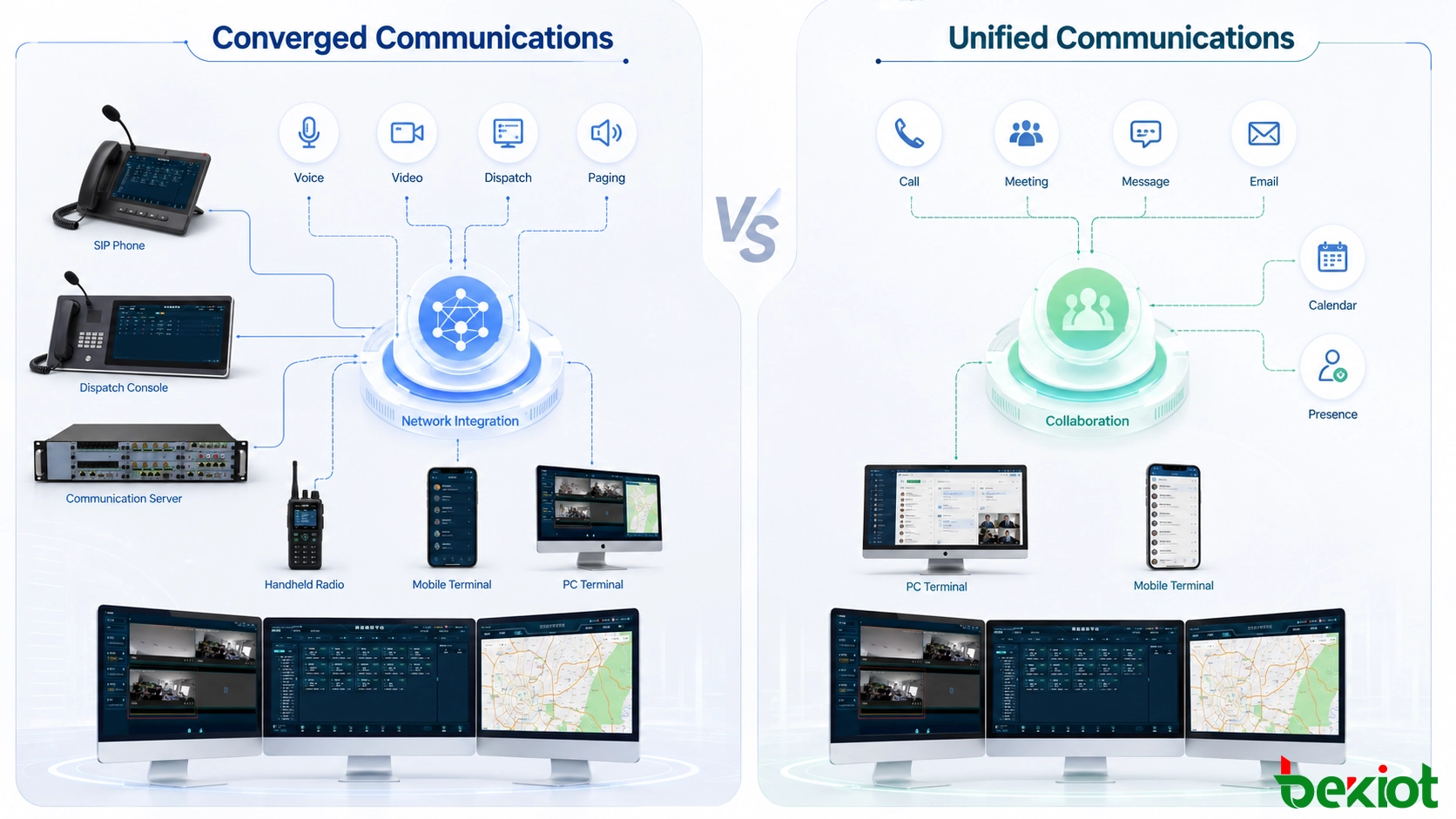
Converged communications and unified communications are often discussed as if they describe the same system. Both combine multiple communication methods, both can support voice and video, and both are intended to reduce the fragmentation created by separate communication tools. The difference becomes clearer when the project moves from terminology to architecture: converged communications focuses primarily on connecting different communication networks, media services and terminals, while unified communications places greater emphasis on bringing communication and collaboration tools into a consistent user environment.
This distinction directly affects system planning. An organization trying to connect voice, video, messaging, mobile terminals and different network resources has a different upgrade priority from an organization trying to combine calling, conferencing, instant messaging, email, presence and business applications into a single workflow. Before replacing platforms or adding new hardware, the project should first determine which problem it is actually trying to solve.
Different Goals Behind the Two Approaches
Converged communications is built around interoperability. Traditional communication environments often contain multiple independent systems: telephony runs on one platform, video on another, messaging on another, and field terminals may depend on different access networks. These systems may all work individually, but the lack of interoperability creates communication islands.
A converged communications architecture attempts to remove these boundaries by carrying different communication services over a common network foundation and establishing interfaces between previously independent systems. Voice, video, data and messaging can then participate in the same broader communication environment.
The objective is not simply to place several applications on one screen. The more important issue is whether different networks, media types, protocols and terminals can communicate with one another reliably.
Unified communications approaches the problem from the user's side. Its emphasis is usually on combining real-time communication, such as voice calls, instant messaging and video meetings, with non-real-time tools such as email, voicemail, calendars and other collaboration services.
Instead of requiring users to move repeatedly between separate applications, a unified communications environment provides a more consistent interface and connects communication activities with the organization's daily workflow.
The distinction can therefore be summarized in practical terms:
Comparison
Converged Communications
Unified Communications
Primary focus
Integration of communication networks, media and technologies
Integration of communication and collaboration workflows
Core objective
Interoperability between previously separated systems
A consistent user experience and more efficient collaboration
Typical services
Voice, video, data, messaging and multi-terminal communication
Calling, conferencing, messaging, email, presence and scheduling
Main architectural concern
IP networking, signaling, media processing and terminal connectivity
Software platforms, middleware, business integration and user interfaces
Typical project objective
Connect communication resources and remove system silos
Simplify employee communication and business collaboration
Converged communications emphasizes interoperability between communication technologies, while unified communications focuses more strongly on the user and collaboration workflow.
Architecture Determines What the System Can Integrate
The difference becomes more visible at the technical architecture level.
Converged communications is typically built around an IP network. Signaling protocols such as SIP can control the establishment, maintenance and termination of communication sessions, allowing different departments, applications and terminals to exchange voice and video services through standardized communication mechanisms.
Media processing is another important layer. Voice, video and data have different bandwidth and processing requirements, so the platform must manage different media streams efficiently. Audio codecs such as G.711 and G.729 and video codecs such as H.264 and H.265 are examples of technologies used to encode and transport media according to available bandwidth and endpoint capabilities.
At the application layer, the system can expose calling, video, messaging and other communication capabilities to users or external systems. APIs allow communication functions to become part of other applications instead of remaining isolated inside the telephone platform.
Terminal diversity also matters. A converged environment may need to connect desktop computers, smartphones, tablets and other intelligent terminals. The objective is to keep communication available as users move between devices and network environments.
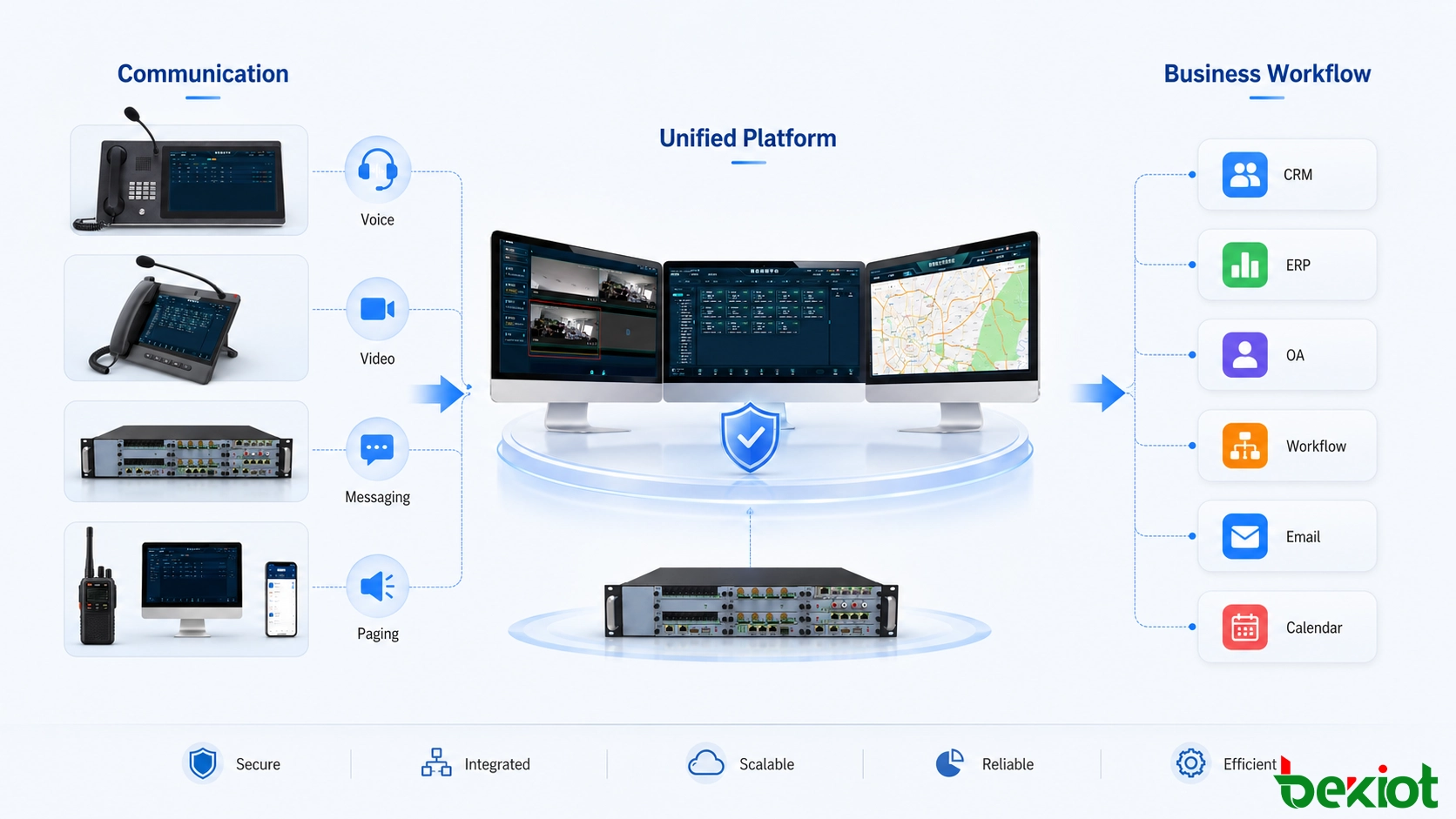
Unified communications is usually more software-centric. Its core platform brings communication and collaboration tools together and uses middleware or APIs to exchange data between calling, messaging, email, calendars and enterprise applications.
Enterprise integration is therefore especially important. Connections with CRM, ERP, OA or other business systems can allow communication events and business information to appear within the same workflow. Rather than treating a phone call and a customer record as unrelated activities, the system can connect the two.
The user interface becomes a major design concern as well. A technically integrated system can still perform poorly if employees must navigate complicated menus or repeatedly change applications. Unified communications therefore places more attention on reducing operating steps and presenting communication and collaboration functions consistently.
Applications Depend on the Operational Objective
Because their design priorities differ, the two approaches are often more suitable for different operational requirements.
Converged communications is valuable when an organization needs to combine several types of communication infrastructure. In enterprise environments, it can bring voice, video and data services under common management. It can also support communication across wired, wireless and mobile networks where employees use different types of terminals.
The same architectural idea can extend beyond conventional office communication. Transportation environments may require information to move between vehicles, infrastructure and management systems. Remote service scenarios may require voice, video and data to be exchanged simultaneously. Connected devices can also become part of a wider communication architecture as projects introduce more intelligent terminals.
Unified communications is particularly relevant to office collaboration, distributed teams and customer service. Employees may need instant messaging, voice calls, meetings, email and scheduling during the same business process. A unified workspace can reduce the need to switch repeatedly between unrelated applications.
Remote collaboration is another common scenario. Team members working from different locations need to communicate in real time while sharing information and project progress. Combining calling, conferencing and collaboration tools can simplify this process.
Customer service provides a different example. Customers may contact an organization through telephone, messaging or email. A unified platform can help service personnel handle these channels through a more consistent operating environment instead of treating each channel as an isolated service.
These examples also show why organizations should avoid choosing a system only because the words “unified” or “converged” appear in the product description. The first question should be whether the project is mainly trying to integrate communication infrastructure, optimize employee collaboration, or accomplish both.
The appropriate architecture depends on whether the main challenge is communication interoperability, user collaboration or a combination of both.
Upgrade Planning Starts With the Existing Environment
A successful communications upgrade should not begin with new servers, licenses or terminals. The existing environment needs to be understood first.
Business requirements are the starting point. Different departments can have very different expectations. A sales organization may depend heavily on customer calls and remote presentations, while an engineering team may place greater value on real-time collaboration and data sharing. Operations teams may require continuous communication across multiple terminals and networks.
The existing system should then be evaluated for stability, performance, compatibility and usability. Common questions include whether calls or media services experience delay, whether new terminals can be connected, whether users face complicated operating procedures, and whether the current architecture can scale as the organization grows.
Future requirements also influence the design. An organization may expand to more locations, increase remote work, introduce additional mobile users or connect more business systems. An upgrade that only solves the current bottleneck may require another major redesign when these requirements appear.
Budget planning should include more than platform licensing. Network upgrades, servers, storage, terminals, integration work, migration, training and ongoing support can all affect the total project scope. Internal technical resources should also be assessed so that responsibilities for deployment and long-term maintenance are clear before implementation begins.
Once these issues are understood, the project can decide whether the existing platform can be expanded, whether selected components should be replaced, or whether a broader architectural migration is necessary.
Modernization Priorities Are Not the Same
Although the planning process is similar, the actual technical upgrade priorities differ.
In a converged communications project, the network deserves early attention because it carries multiple media services. If available bandwidth or network stability is insufficient, higher-quality voice and video services will not perform consistently. Depending on the environment, modernization may involve higher-capacity Ethernet or fiber infrastructure, improved wireless access, or technologies such as 5G and Wi-Fi 6.
Media processing should also be reviewed. More efficient voice and video coding can reduce bandwidth requirements while maintaining the required communication quality. Newer video compression technologies such as H.266/VVC may be considered where the platform and endpoints support them, while audio processing such as echo cancellation and noise suppression can improve voice intelligibility.
Terminal compatibility is another practical concern. Organizations rarely replace every endpoint at the same time. The upgraded architecture may therefore need to support existing computers and mobile devices while leaving room for newer intelligent or IoT-based terminals.
Security and reliability should be designed into the upgrade rather than added after deployment. Communication traffic can contain sensitive voice, video and business information, so encryption, access control, backup, recovery and failover strategies need to be evaluated according to the project.
Unified communications modernization usually places more emphasis on the software environment.
The collaboration platform should be assessed for functional coverage, compatibility and ease of operation. Middleware and API capabilities also matter because information needs to move efficiently between messaging, email, calendars and enterprise applications.
Deeper business integration can provide greater value than adding another isolated communication tool. Connections with CRM, ERP, project management or data platforms can allow users to access relevant business information while communicating, reducing repeated manual switching between systems.
User experience should also be treated as an upgrade requirement. A system with more features is not necessarily more efficient. Interface design, search, commonly used operations and personalized settings can have a direct impact on whether employees actually adopt the new platform.
Migration Should Be Planned as an Operational Project
Once the architecture has been selected, implementation should be treated as a controlled migration rather than a simple installation.
Hardware resources such as servers, switches, storage and terminals need to be sized and configured according to the selected architecture. Network configuration should then be verified, including addressing, routing, VLAN design and the bandwidth and latency conditions required by real-time media.
Software deployment follows the infrastructure work. Operating systems, databases, communication services and middleware need to be installed and configured before interfaces with existing IT systems are enabled.
Integration is one of the points where many upgrades become more complex than expected. CRM, ERP, OA and other systems may use different data structures or authentication mechanisms. API and middleware interfaces therefore need to be tested as part of the complete business workflow, not only as individual technical connections.
Data migration also requires a recovery plan. Existing user data, configuration information and historical records should be transferred according to a defined migration process, with backups available in case the migration needs to be rolled back.
Users should be trained according to their roles. Administrators need configuration and maintenance knowledge, while ordinary users mainly need to understand the communication and collaboration functions relevant to their daily work. Operation, installation and maintenance documentation should be delivered together with the system so that knowledge does not remain only with the implementation team.
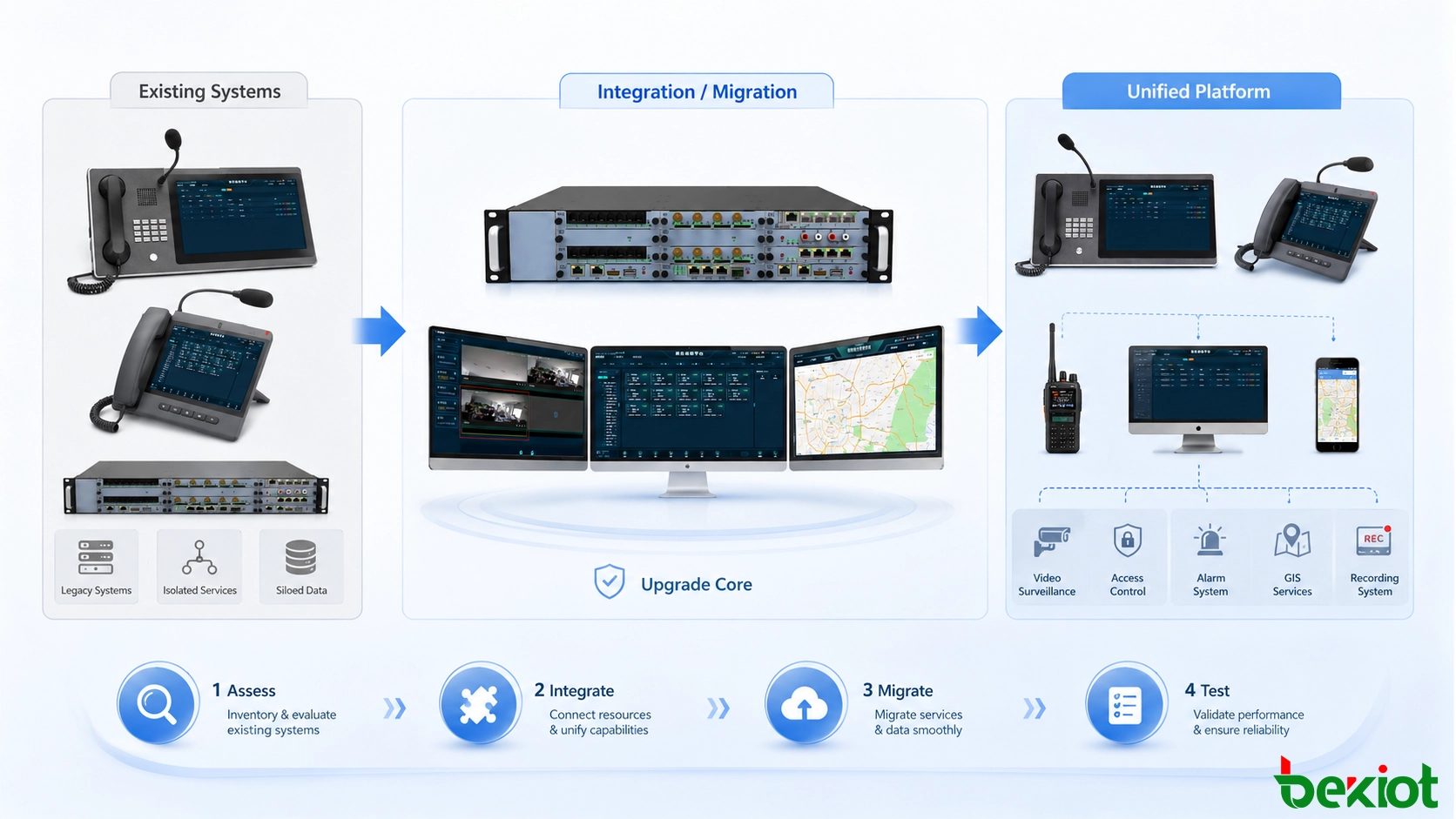
A communications upgrade should move from assessment and architecture design through integration, migration, testing and final operational handover.
Testing Must Reflect Real Operating Conditions
A system should not be considered ready simply because the software has been installed and users can log in.
Functional testing should verify calling, video, messaging, data sharing and other required services against the agreed business requirements. Where multiple terminals are supported, the same functions should also be tested across different devices and operating environments.
Compatibility testing becomes particularly important during phased upgrades because legacy terminals, new clients, browsers and operating systems may coexist for a long period.
Performance testing should establish measurable targets before the system enters production. Useful indicators include response time, throughput, concurrent user capacity and resource utilization. Load should be increased progressively to identify bottlenecks in the network, software, database or server resources.
Stability cannot be judged from a short demonstration. Long-duration operation testing may run for several days or even weeks so that the project team can observe whether memory consumption, service performance or connection stability deteriorates over time.
Security testing should cover authentication, permissions, communication protection and interface exposure according to the scope of the deployment. Backup and failover mechanisms should also be tested rather than simply assumed to work.
Final acceptance should therefore cover functionality, performance, stability, security and compatibility. Problems found during testing should be corrected and verified again before the platform becomes the organization's primary communication environment.
Conclusion
Converged communications and unified communications overlap in many areas, but they are not identical concepts. Converged communications focuses more strongly on connecting networks, media services, protocols and terminals so that previously independent communication resources can work together. Unified communications concentrates more on combining communication and collaboration tools into a consistent user experience and linking them with business workflows.
The difference matters most during system modernization. A converged communications upgrade typically places greater emphasis on IP networking, media processing, endpoint compatibility, security and reliability. A unified communications upgrade usually gives more attention to software platforms, middleware, enterprise integration and user experience.
In either case, the strongest upgrade strategy begins with real business requirements and the current system rather than with a predetermined technology. Careful assessment, phased integration, data protection, user training and realistic acceptance testing make it possible to modernize communications without turning the migration itself into an operational risk.
Becke Telcom provides converged communication solutions for industrial, transportation, energy, emergency response and other professional communication environments. According to existing network resources and operational requirements, the system can integrate voice, video, dispatch, paging, intercom and other communication capabilities while supporting connections with existing SIP networks, communication terminals and business systems. This allows organizations to modernize communication infrastructure in stages, retain usable existing resources and build a more unified communication and dispatch environment without unnecessary large-scale replacement.
FAQ
Can an organization upgrade communication services without replacing every existing endpoint?
Often yes. A phased upgrade can retain compatible terminals and replace only the components that prevent the new architecture from meeting its requirements. Compatibility and interface testing should be completed before deciding which devices can remain in service.
Should the old communication platform remain available during migration?
For business-critical environments, maintaining a controlled transition period can reduce operational risk. The exact approach depends on the architecture, but rollback procedures and backup configurations should be prepared before major services are migrated.
Who should participate in the acceptance process?
Acceptance should involve more than the IT implementation team. Representatives from administration, operations and departments that rely heavily on communication services can verify whether technical functions also match real working procedures.
How can user adoption problems be reduced after an upgrade?
Training should focus on role-specific workflows rather than presenting every available feature. Clear operating procedures, familiar interfaces and early feedback from representative users can make the transition easier and identify unnecessary complexity before full deployment.
How often should the upgraded architecture be reviewed?
A review is useful whenever user scale, network conditions, endpoint types or connected business systems change significantly. Periodic capacity and compatibility checks can identify limitations before they become service problems.
Becke Telcom specializes in industrial explosion-proof comms for rail, tunnel, oil & gas, and marine sectors, offering PAGA, SOS, and IP telephones with integrated PA, intercom, and calling.
If you have any suggestions or questions for us, please feel free to contact us!
We use cookie to improve your online experience. By continuing to browse this website, you agree to our use of cookie.
Cookies
Please read our Terms and Conditions and this Policy before accessing or using our Services. If you cannot agree with this Policy or the Terms and Conditions, please do not access or use our Services. If you are located in a jurisdiction outside the European Economic Area, by using our Services, you accept the Terms and Conditions and accept our privacy practices described in this Policy. We may modify this Policy at any time, without prior notice, and changes may apply to any Personal Information we already hold about you, as well as any new Personal Information collected after the Policy is modified. If we make changes, we will notify you by revising the date at the top of this Policy. We will provide you with advanced notice if we make any material changes to how we collect, use or disclose your Personal Information that impact your rights under this Policy. If you are located in a jurisdiction other than the European Economic Area, the United Kingdom or Switzerland (collectively “European Countries”), your continued access or use of our Services after receiving the notice of changes, constitutes your acknowledgement that you accept the updated Policy. In addition, we may provide you with real time disclosures or additional information about the Personal Information handling practices of specific parts of our Services. Such notices may supplement this Policy or provide you with additional choices about how we process your Personal Information.
Cookies
Cookies are small text files stored on your device when you access most Websites on the internet or open certain emails. Among other things, Cookies allow a Website to recognize your device and remember if you've been to the Website before. Examples of information collected by Cookies include your browser type and the address of the Website from which you arrived at our Website as well as IP address and clickstream behavior (that is the pages you view and the links you click).We use the term cookie to refer to Cookies and technologies that perform a similar function to Cookies (e.g., tags, pixels, web beacons, etc.). Cookies can be read by the originating Website on each subsequent visit and by any other Website that recognizes the cookie. The Website uses Cookies in order to make the Website easier to use, to support a better user experience, including the provision of information and functionality to you, as well as to provide us with information about how the Website is used so that we can make sure it is as up to date, relevant, and error free as we can. Cookies on the Website We use Cookies to personalize your experience when you visit the Site, uniquely identify your computer for security purposes, and enable us and our third-party service providers to serve ads on our behalf across the internet.
We classify Cookies in the following categories: ● Strictly Necessary Cookies ● Performance Cookies ● Functional Cookies ● Targeting Cookies
Cookie List A cookie is a small piece of data (text file) that a website – when visited by a user – asks your browser to store on your device in order to remember information about you, such as your language preference or login information. Those cookies are set by us and called first-party cookies. We also use third-party cookies – which are cookies from a domain different than the domain of the website you are visiting – for our advertising and marketing efforts. More specifically, we use cookies and other tracking technologies for the following purposes:
Strictly Necessary Cookies These cookies are necessary for the website to function and cannot be switched off in our systems. They are usually only set in response to actions made by you which amount to a request for services, such as setting your privacy preferences, logging in or filling in forms. You can set your browser to block or alert you about these cookies, but some parts of the site will not then work. These cookies do not store any personally identifiable information.
Functional Cookies These cookies enable the website to provide enhanced functionality and personalisation. They may be set by us or by third party providers whose services we have added to our pages. If you do not allow these cookies then some or all of these services may not function properly.
Performance Cookies These cookies allow us to count visits and traffic sources so we can measure and improve the performance of our site. They help us to know which pages are the most and least popular and see how visitors move around the site. All information these cookies collect is aggregated and therefore anonymous. If you do not allow these cookies we will not know when you have visited our site, and will not be able to monitor its performance.
Targeting Cookies These cookies may be set through our site by our advertising partners. They may be used by those companies to build a profile of your interests and show you relevant adverts on other sites. They do not store directly personal information, but are based on uniquely identifying your browser and internet device. If you do not allow these cookies, you will experience less targeted advertising.
How To Turn Off Cookies You can choose to restrict or block Cookies through your browser settings at any time. Please note that certain Cookies may be set as soon as you visit the Website, but you can remove them using your browser settings. However, please be aware that restricting or blocking Cookies set on the Website may impact the functionality or performance of the Website or prevent you from using certain services provided through the Website. It will also affect our ability to update the Website to cater for user preferences and improve performance. Cookies within Mobile Applications
We only use Strictly Necessary Cookies on our mobile applications. These Cookies are critical to the functionality of our applications, so if you block or delete these Cookies you may not be able to use the application. These Cookies are not shared with any other application on your mobile device. We never use the Cookies from the mobile application to store personal information about you.
If you have questions or concerns regarding any information in this Privacy Policy, please contact us by email at . You can also contact us via our customer service at our Site.

 English
 Deutsch
 한국어
한국어 Русский
 Français
 日本語
日本語 لالعربية
 हिन्दी
 Español
 Português
 繁体中文
繁体中文 简体中文
简体中文